2026 DevOps CheatSheet
3 Infrastructure as Code (IaC)
3-1 TERRAFORM WITH AWS AND KUBERNETES
Terraform is an Infrastructure as Code (IaC) tool that allows us to define, provision and manage cloud resources in a declarative and automated way.
It supports multiple providers, including AWS, Kubernetes and many others.
2. Terraform Core Concepts
- Provider - A plugin to interact with APls (e.g., AWS, Kubernetes)
- Resource - A managed infrastructure component (e.g., EC2, S3)
- Data Source - Fetches information from existing resources
- Variables - Input values to make configuration dynamic
- State File - Stores the current state of infrastructure
- Modules - Reusable configurations for best practices
3. Terraform with AWS
Common AWS Resources
| Category | Resources (Examples) |
|---|---|
| Compute | EC2, Auto Scaling Group, Lambda |
| Storage | S3, EBS, EFS |
| Networking | VPC, Subnet, Internet Gateway, Route Table, Security Group |
| Database | RDS, DynamoDB |
| Security | IAM, KMS, Security Group |
| Others | CloudWatch, SNS, SQS, ELB |
Benefits
- → Consistent and repeatable deployments
- → Version controlled infrastructure
- → Cost effective and highly available architecture
- → Easy scaling and management
Sample: AWS Infrastructure using Terraform
Internet
  └── AWS Cloud
        └── VPC 10.0.0.0/16
              ├── Public Subnet 10.0.1.0/24
              │     └── EC2 Instance (Web Server)
              └── Private Subnet 10.0.2.0/24
                    └── RDS Instance (Database)
provider "aws" {
    region = "ap-south-1"
}

resource "aws_instance" "web" {
    ami = "ami-0c55b159cbfaef1f0"
    instance_type = "t2.micro"
    subnet_id = aws_subnet.public.id
    security_groups = [aws_security_group.web_sg.name]
    tags = {
        Name = "Terraform-EC2-Instance"
    }
}
4. Terraform with Kubernetes
- Terraform can manage Kubernetes resources using the Kubernetes provider.
- It can create namespaces, deployments, services, configmaps, secrets and more.
- Use case: Provision infrastructure in AWS and then deploy applications on EKS using Terraform.
Example: Kubernetes Resources
- Namespace
- Deployment
- Service
- ConfigMap
- Secret
Example Terraform Snippet (Kubernetes - Deployment)
provider "kubernetes" {
  config_path = "/.kube/config"
}

resource "kubernetes_deployment" "app" {
  metadata {
    name = "my-app"
    labels = {
      app = "my-app"
    }
  }
  spec {
    replicas = 2
    selector {
      match_labels = {
        app = "my-app"
      }
    }
    template {
      metadata {
        labels = {
          app = "my-app"
        }
      }
      spec {
        container {
          image = "nginx:latest"
          name = "nginx"
          port {
            container_port = 80
          }
        }
      }
    }
  }
}
EKS Architecture

AWS
|
VPC
|
EKS Cluster
|
Kubernetes
Resources
(Pods, Services etc.)
Best Practices
- Use remote backend (S3 + DynamoDB) for state locking.
- Write modular and reusable Terraform code.
- Use variables and locals for flexibility.
- Enable versioning and tagging for all resources.
- Follow security best practices (IAM least privilege, security groups).
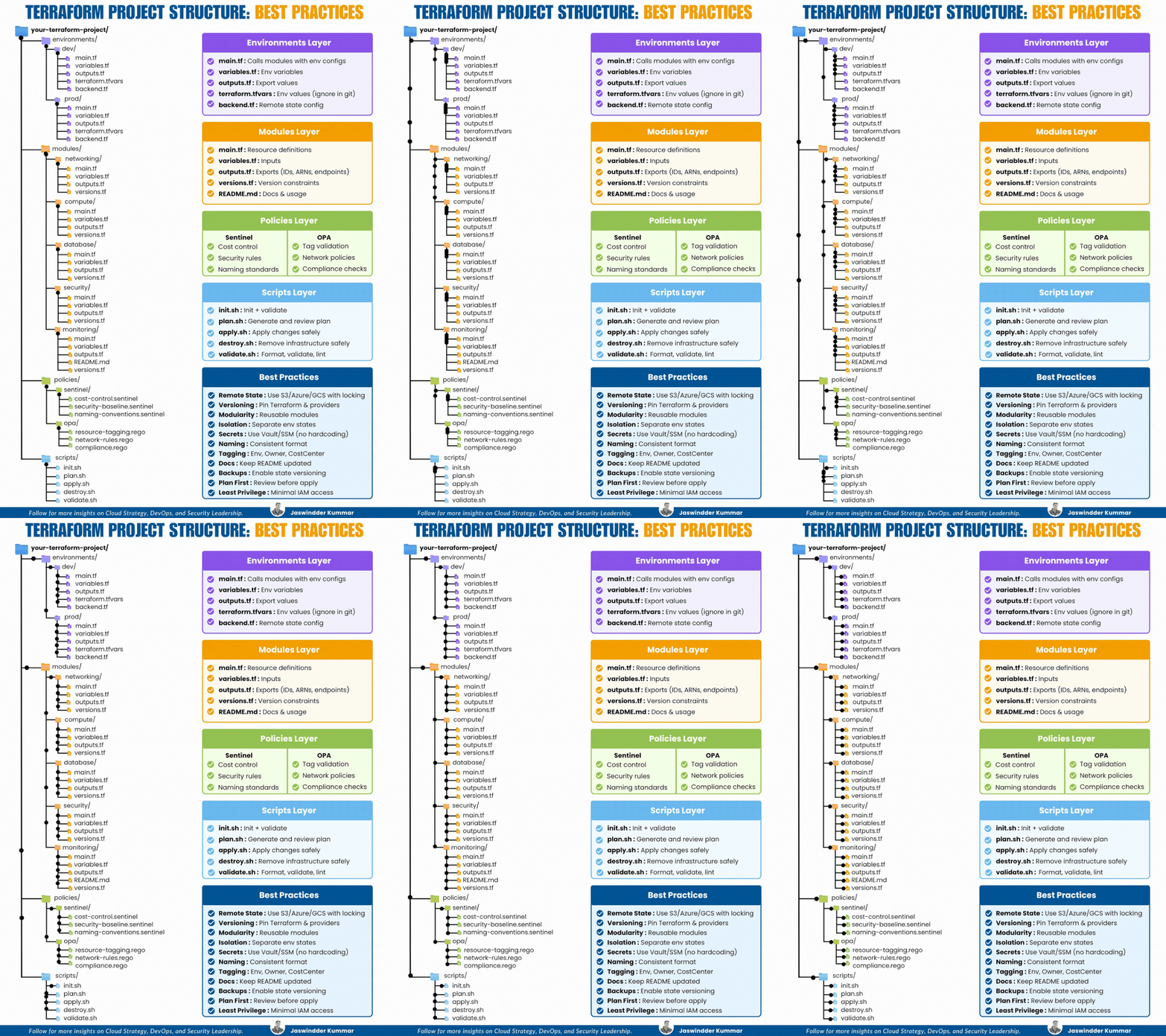
Step-by-Step Configuration Guide with AWS EC2 Instance
- Main Terraform Configuration: main.tf:
Terraform Configuration Example:
terraform {
  required_providers {
    aws = {
      source = "hashicorp/aws"
      version = "> 4.16"
    }
  }
  required_version = "> 1.2.0"
}

provider "aws" {
  region = "us-west-2"
}

resource "aws_instance" "app_server" {
  ami = "ami-08d70e59c07c61a3a"
  instance_type = "t2.micro"

  tags = {
    Name = var.instance_name
  }
}
2. Input Variables: variables.tf
Example:
variable "instance_name" {
  description = "Value of the Name tag for the EC2 instance"
  type        = string
  default     = "ExampleAppServerInstance"
}
3. Output Values: outputs.tf
output "instance_id" {
  description = "ID of the EC2 instance"
  value       = aws_instance.app_server.id
}

output "instance_public_ip" {
  description = "Public IP address of the EC2 instance"
  value       = aws_instance.app_server.public_ip
}
4. Running the Configuration
Initialize Terraform:
terraform init
Apply the Configuration:
terraform apply
- Confirm by typing
yeswhen prompted.
Inspect Output Values:
terraform output
Destroy the Infrastructure:
terraform destroy
Terraform Advanced Configuration Use Cases
1. Provider Configuration:
provider "aws" {
  region = "us-west-2"
}
2. Resource Creation:
resource "aws_instance" "example" {
  ami           = "ami-0c55b159cbfafe1f0"
  instance_type = "t2.micro"
  tags = {
    Name = "ExampleInstance"
  }
}

**3. Variable Management:**

```hcl
variable "region" {
  default = "us-west-2"
}

provider "aws" {
  region = var.region
}
4. State Management:
Example for using remote state in S3:
terraform {
  backend "s3" {
    bucket          = "my-tfstate-bucket"
    key             = "terraform/state"
    region          = "us-west-2"
    encrypt         = true
    dynamodb_table  = "terraform-locks"
  }
}
5. Modules:
Module Configuration:
module "vpc" {
  source = "terraform-aws-modules/vpc/aws"

  name = "my-vpc"
  cidr = "10.0.0.0/16"

  azs = ["us-west-2a", "us-west-2b"]

  public_subnets = ["10.0.1.0/24", "10.0.2.0/24"]

  private_subnets = ["10.0.3.0/24", "10.0.4.0/24"]
}
Terraform Commands Cheat Sheet
- terraform init: Initializes the Terraform configuration.
- terraform fmt: Formats configuration files.
- terraform validate: Validates the configuration files.
- terraform plan: Previews changes to be applied.
- terraform apply: Applies the changes to reach the desired state.
- terraform destroy: Destroys the infrastructure and removes it from the state.
- terraform show: Displays the current state of resources.
- terraform state list: Lists resources in the current state.
- terraform taint
: Marks a resource for recreation. - terraform import
- terraform providers: Lists the providers used in the configuration.
Terraform Best Practices
- Use Version Control to manage your Terraform code.
9. Networking, Ports & Load Balancing
9-1 Networking Basics
IP Addressing
- Private IPs: 10.0.0.0/8, 172.16.0.0/12, 192.168.0.0/16
- Public IPs: Assigned by ISPs
- CIDR Notation: 192.168.1.0/24 (Subnet Mask: 255.255.255.0)
Protocols
- TCP (Reliable, connection-based)
- UDP (Fast, connectionless)
- ICMP (Used for ping)
- HTTP(S), FTP, SSH, DNS
9-2. Network Commands
ip a # Show IP addresses
ifconfig # Older command
Check connectivity ping google.com
Trace route traceroute google.com
DNS lookup
nslookup google.com
dig google.com
Test ports
telnet google.com 80
nc -zv google.com 443
Firewall Rules (iptables) List firewall rules
sudo iptables -L -v
Allow SSH: sudo iptables -A INPUT -p tcp --dport 22 -j ACCEPT
Block an IP sudo iptables -A INPUT -s 192.168.1.100 -j DROP
Netcat (nc): Start a simple TCP listener nc -lvp 8080
Send data to a listening server echo "Hello" | nc 192.168.1.100 8080
9-3 Kubernetes Networking
List services and their endpoints
kubectl get svc -o wide
Get pods and their IPs
kubectl get pods -o wide
Port forward a service
kubectl port-forward svc/my-service 8080:80
Expose a pod
kubectl expose pod mypod --type=NodePort --port=80
9-4. Docker Networking
List networks docker network ls
Inspect a network docker network inspect bridge
Create a custom network docker network create mynetwork
Run a container in a custom network docker run -d --network=mynetwork nginx