Microsoft AB-100 Agentic AI Exam Prep
1 Prep Course for AB100
WHAT YOU'LL GET FROM THIS COURSE
- Foundational Knowledge — Understand agentic AI architecture and mechanics
- Practical Skills — Design workflows, patterns, orchestration
- Exam Alignment — Every lecture maps to AB-100 exam blueprint
- Confidence — Understand the why behind each concept
COURSE STRUCTURE (8 SECTIONS)
Agentic Ai can handle complex problems:
- • Customer support escalation
- • Contract negotiation
- • Supply chain optimization
- • Strategic planning
- • Safety guardrails
- • Governance frameworks
- • Continuous monitoring
- • Ethical oversight
HOW TO ALLOCATE YOUR TIME
- Deploy/Govern/Secure (40-45%) → ~40% of study time
- Plan + Design (50-60%) → ~45% of study time
- Platform + Evaluation + Scenarios → ~15% of study time
KEY TAKEAWAYS
-
- Format: 80 Q's, 90 min, adaptive, ~70% to pass
-
- Pacing: Simple Q's are quick; scenarios take 2-4 minutes
-
- Question types: Multiple choice, multi-select, scenario, drag-drop
-
- Competencies: 5 areas; governance is the heaviest
-
- Focus: Business reasoning & safe deployment, not coding
WHAT THE EXAM TESTS
IS Testing:
- • Real-world scenario reasoning
- • Trade-offs (speed vs. safety, autonomy vs. control)
- • Best practices for design & deployment
- • Business problem mapping
- • Governance & ethical thinking
IS NOT Testing:
- • Deep ML theory or mathematics
- • Coding or programming ability
- • Model training or fine-tuning
- • Specific tool APIs or syntax
DOMAIN AREAS (3 TOTAL)
- Plan AI-Powered Business Solutions — 25-30%
- Design AI-Powered Business Solutions — 25-30%
- Deploy AI-Powered Business Solutions — 40-45%
(includes governance, evaluation, monitoring)
EXAM BASICS
- • Total questions: 80
- • Time limit: 90 minutes
- • Passing score: 700/1000 (~70%)
- • Question types: Multiple choice, scenario, drag-and-drop
- • Format: Adaptive (difficulty adjusts to your performance)
- • Cost: $165 USD
- • Delivery: Computer-based, proctored online
Average time per question: ~1 min 7 sec (but scenarios take longer)
Exam Insight
The AB-100 exam is testing whether you can:
- Plan solutions that fit business needs
- Design systems that work
- Deploy & Govern them safely
- Measure success
- Align with real-world business goals
NOT testing deep ML knowledge or coding ability
2 Microsoft AI Landscape
What is Agentic AI, Really?
- Define the key terms
- Explore what's happening in the industry
- Set the foundation for everything that follows
What Is Agentic AI?
Agentic AI = Goal + Reasoning + Tools + Action
- Goal — the target outcome
- Reasoning — decides what to do next
- Tools — APls, workflows, data sources
- Action — executes steps to reach the goal
KEY TERMS (QUICK DEFINITIONS)
- Agent — decision-maker that chooses actions
- Tools — capabilities the agent can invoke
- Orchestration — coordinates steps and tool calls
- Planning — breaks goals into sub-tasks
- Memory — retains context over time
- Guardrails — safety and compliance constraints
ANALOGY: AGENT AS PROJECT MANAGER
Receives a goal
- Defines success criteria
- Prioritizes tasks
Breaks it down
- Creates a plan
- Delegates steps
Uses tools
- Calls systems and APls
- Requests info from teams
Adapts
- Updates plan
- Stays within guardrails
WHAT AGENTIC AI IS NOT
- Not just a chatbot — chat can be part of an agent
- Not traditional automation — "if X then Y" only
- Not a standalone model — the model is one component
BUSINESS IMPACT
- Faster decisions through automated reasoning
- Reduced operational load via delegated tasks
- Scalable workflows that adapt to variability
- Better alignment with business goals
Guardrails are constraints that keep agents safe, compliant, and aligned
KEY TAKEAWAYS
- Agentic AI is goal-driven, tool-using, action-taking AI.
- Know the terms: agent, tools, orchestration, planning, memory, guardrails.
- It's not just chat or automation — it's decision + action + adaptation.
- The exam emphasizes business impact and safe deployment.
2-1 Microsoft AI Landscape: Copilot Studio vs. AI Foundry
- Agentic solutions are rarely built on a single tool
- Exam scenarios test your ability to select the right platform mix
- Focus: Business alignment, governance, and scale — not tool mastery
Key platforms:
- Copilot Studio → No-code agent building
- Azure AI Foundry → Custom models & advanced orchestration
- Power Platform → Low-code flows & connectors
- Dynamics 365 → Industry-specific business apps
- Microsoft 365 Copilot → Productivity & extensibility
PLATFORM COMPARISON TABLE
| Platform | Strength | Role | Best For | Weight |
|---|---|---|---|---|
| Copilot Studio | No-code agent builder | Task, autonomous, prompt | Quick prototyping | High |
| Azure AI Foundry | Custom models, fine-tune | Advanced reasoning, multi | Complex, scalable agents | High |
| Power Platform | Connectors, flows | Data grounding, orchestration | Low-code workflows | Medium |
ECOSYSTEM INTEGRATION FLOW
- Copilot Studio agents call Azure AI Foundry models via MCP
- Power Automate triggers Dynamics actions
- Microsoft 365 Copilot extends with custom agents from Copilot Studio
Agentic Solution
- Copilot Studio agents call Foundry models via MCP
- Power Automate triggers Dynamics actions
- Microsoft 365 Copilot extends with custom agents from Copilot Studio
KEY TAKEAWAYS
- Microsoft ecosystem is modular — mix platforms for the best fit
- AB-100 tests platform selection based on business requirements
- Always consider governance, scale, and cost in your answers
- Know when to pick speed (Copilot Studio) vs. customization (Azure AI Foundry)
2-2 Microsoft AI Agent Types & Capabilities Explained
AB-100 AGENT TYPES
| Agent Type | Autonomy Level | Key Capabilities | Best Microsoft Platform(s) | Typical Use Case |
|---|---|---|---|---|
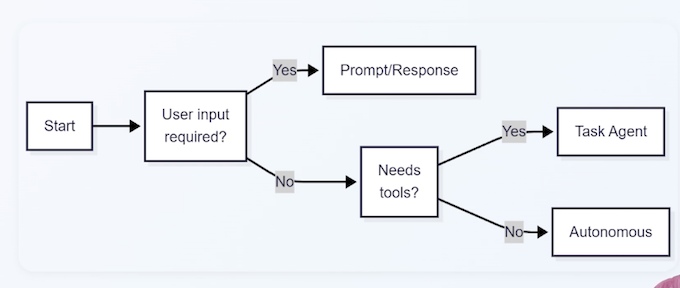
| Prompt/Response | Low | Responds to user input with reasoning | Copilot Studio, Microsoft 365 Copilot | Chat-based support, simple Q&A |
| Task | Medium | Executes bounded tasks with tools | Copilot Studio + Power Automate | Escalation, data lookup, approval workflows |
| Autonomous | High | Independent planning, multi-step actions | Copilot Studio + Azure AI Foundry Agent Service | Background monitoring, proactive workflows |
CAPABILITIES BY PLATFORM
- Copilot Studio: All three types + topics, actions, connectors
- Azure AI Foundry: Enhances autonomous agents with custom models & multi-agent orchestration
- Power Platform: Adds grounding & flows for task/autonomous agents
- Dynamics 365: Prebuilt task & autonomous agents (e.g., Sales Copilot)
- Microsoft 365 Copilot: Primarily prompt/response, extensible to task
KEY TAKEAWAYS
- Know the three agent types: prompt/response, task, autonomous
- Autonomous agents are powerful but require strong guardrails
- Exam favors balancing autonomy with governance
2-3 Copilot Studio Core Concepts: Topics, Tools & Connectors
$ COPILOT STUDIO OVERVIEW
- No-code/low-code platform for building agents
- Core building blocks: Topics, Tools, Connectors, Knowledge
- Supports all agent types (prompt/response, task, autonomous)
Exam focus: Designing agents in Copilot Studio (topics → tools → flows)
CORE COMPONENTS TABLE
| Component | Purpose | Exam Relevance |
|---|---|---|
| Topics | Conversation scenarios & branching | Defines agent behavior & user interaction |
| Tools | Connectors, API calls, prompts, agent flows | Enables agent to take real-world actions |
| Connectors | 1000+ prebuilt (Dynamics, Dataverse, etc.) | Grounds agents in enterprise data |
| Knowledge | Grounding sources (Dataverse, SharePoint, web) | Prevents hallucinations, improves accuracy |
Example: Topic "Escalate Issue" → Tool "Create Case in Dynamics" → Connector to Dynamics 365
AGENT DESIGN FLOW IN COPILOT STUDIO
GOVERNANCE & SECURITY IN COPILOT STUDIO
- Built-in guardrails (content filters, data loss prevention)
- Environment isolation (dev/test/prod)
- Role-based access control
KEY TAKEAWAYS
- Copilot Studio is the primary no-code agent builder
- Know the four core components: topics, tools, connectors, knowledge
- Exam emphasizes grounding & guardrails for reliable agents
2-4 Azure AI Foundry Tools & Model Selection
WHAT IS AZURE AI FOUNDRY?
Centralized platform for AI model discovery, hosting, and customization — your model headquarters.
- Model Catalog - Thousands of models: Azure OpenAl (GPT-4), Anthropic Claude, Meta Llama, Mistral, and more
- Fine-Tuning Tools — Adapt models to your specific domain data and industry terminology
- Agent Service — Scalable agent hosting (LangGraph, Semantic Kernel)
Key distinction: Copilot Studio = speed & accessibility.
Azure AI Foundry = deeper customization, scale, and control.
WHEN TO USE AZURE AI FOUNDRY
The exam loves testing this decision point. Use Foundry when:
- Off-the-shelf models lack accuracy for your industry data (financial, medical, legal)
- Dynamic routing needed - route simple queries to cheaper models, complex to premium (cost optimization)
- Multi-agent orchestration or complex custom tool integration required
- Strict data privacy or compliance — full control over where data goes and deployment
Trigger words: domain-specific, fine-tuning, compliance, multi-agents enterprise scale → Think Foundry
FOUNDRY CAPABILITIES FOR AGENTS
Agent Service hosts your agents with built-in scaling, observability, and cost tracking.
- Dynamic model routing — Cost optimization at scale
- Multi-agent orchestration — Agent2Agent protocol support
- Built-in telemetry - Performance metrics and cost tracking
- Tool integration via MCP — Expose agents securely to other systems
"Quick deployment" → Copilot Studio.
"Custom reasoning and scale" Azure AI Foundry. The answer depends on what the scenario emphasizes.
KEY TAKEAWAYS
- Azure AI Foundry = custom models + agent hosting at enterprise scale
- Choose Foundry for fine-tuning, dynamic routing, complex workflows, or high-scale needs
- Always weigh against Copilot Studio - simpler is better when it meets requirements
- Foundry is the answer when off-the-shelf isn't enough
2-5 How AI Agents Talk to Each Other: MCP & AgentAgent Protocol
MODEL CONTEXT PROTOCOL (MCP)
MCP — Originated from Anthropic, adopted by Microsoft Agents securely request tools, APIs, or context from MCP servers
- Agent calls MCP server (not direct API endpoints)
- MCP server acts as secure intermediary
- Build your own with Azure Functions or use existing servers
WHY MCP? 🧑💻🧑💻🧑💻
- Secure Access: Central control over what agents can call
- Auditability All tool calls logged and traceable
- Reusability Share MCP servers across multiple agents
- Interoperability Works across Copilot Studio, Foundry, custom code
MCP EXAM EXAMPLE
"How do you let an Azure AI Foundry agent securely access a private database?"
Answer: Register an MCP server that connects to that database
Agent → MCP Server → Database (with proper credentials & access control)
AGENTZAGENT (A2A) PROTOCOL. 👩🏻💻👩🏻💻👩🏻💻
Open protocol — Originated from Google, supported by Microsoft
- MCP: Agent-to-tool communication
- A2A: Agent-to-agent communication
A2A enables agents to communicate, delegate, and collaborate across platform
A2A IN ACTION
Multi-agent workflow example:
- Research Agent → finds relevant documents
- Summarizer Agent → distills key points
- Approver Agent → validates before surfacing to user
Works cross-platform: Copilot Studio + Azure Ai Foundry + custom agents
INTEGRATION EXAMPLE
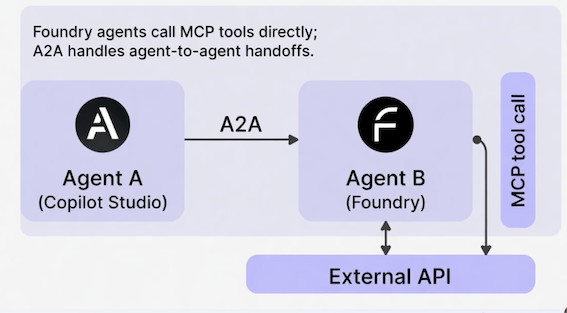
"Orchestrating multiple agents securely" → AZA + MCP
- AZA handles agent-to-agent coordination
- MCP handles agent-to-tool access
- Together, they cover both bases for enterprise scenarios
KEY TAKEAWAYS
- MCP = secure, auditable tool access across agents
- A2A = multi-agent collaboration and delegation
- Use both for governance, scalability, or interoperability questions
- Together, these protocols enable enterprise-grade agentic systems
2-6 Build Custom AI Models in Azure Foundry - Build vs. Buy vs. Extend
THE PRAGMATIC HIERARCHY
- Off-the-shelf models + prompt engineering + RAG
- Only escalate to custom fine-tuning when that fails
"Fails" must mean something specific — not just preference
WHEN TO ESCALATE TO CUSTOM
| Trigger | Example |
|---|---|
| Domain accuracy critical | Legal, financial, medical terminology |
| Privacy/compliance | Data must stay on your infrastructure |
| Scale demands cost optimization | Thousands of queries daily |
| Proprietary patterns | Internal jargon, unique business logic |
DESIGNING CUSTOM MODELS IN FOUNDRY
| Step | Action | Note |
|---|---|---|
| 1 | Select base model from catalog | GPT-4, Llama, etc. |
| 2 | Prepare training data | Clean, label, format — 80% of the work |
| 3 | Fine-tune | Supervised or LoRA adapters |
| 4 | Evaluate rigorously | Auto-scaling |
| 5 | Deploy to Agent Service | Accuracy, safety, bias, hallucinations |
| 6 | Expose via MCP | Other agents can call securely |
ADVANCED FOUNDRY FEATURES
- Dynamic routing — Simple queries → cheap model, complex → premium
- Multi-agent orchestration — Custom models participate via A2A
- Telemetry & governance — Track usage, costs, hallucination rates
KEY TAKEAWAYS
- Custom models solve domain accuracy and compliance gaps
- Azure AI Foundry = fine-tuning, evaluation, and hosting
- Always justify with business trade-offs (cost, governance, performance)
- Evaluate first, deploy second, monitor continuously
- Exam mantra: "Start simple, escalate thoughtfully"
3 Agentic AI Solutions 🤖
3-1 Requirement Analysis for Agentic AI Solutions
WHY REQUIREMENT ANALYSIS MATTERS
- First step in the "Plan" domain (25-30% of the exam)
- Exam scenarios: "A company wants to automate X — should they use agents?"
- Goal: Determine if agentic AI is the right fit vs. traditional automation
Three key questions:
- What is the business goal?
- What are the constraints (budget, timeline, regulation, data)?
- Does the task need adaptive, multi-step, tool-using
GOOD FIT FOR AGENTIC AI
Characteristic
- Multi-step, decision-heavy tasks: Customer escalation with research
- Ambiguous, variable processes: Supply chain exception handling
- Requires calling tools or APIs: Query multiple systems and act on results
- High compliance needs (with guardrails): Financial decision support
Purely repetitive, rule-based tasks : Better Alternative: Power Automate flow
Simple Q&A with no follow-up action: Standard Copilot or FAQ bot
Static, single-step processes: Traditional workflow automation
REQUIREMENT ANALYSIS FRAMEWORK
Best answers identify goal first, then constraints, then justif not) with trade-offs.
Business Goal -> Constraints & Risks -> Agentic Fit -> Recomendedd Solutuon
RISK ASSESSMENT FRAMEWORK
| Dimension | Question | Example (Contract Review Agent) |
|---|---|---|
| Likelihood | How probable is this risk? | Data staleness — Medium |
| Impact | How severe if it occurs? | Hallucination on legal clause — High |
| Mitigation | What reduces risk? | Human review for flagged items |
KEY TAKEAWAYS
- Always start with business goal and constraints
- Agentic shines in adaptive, multi-step, tool-dependent processes
- Assess risks early — likelihood, impact, mitigation
- Exam rewards "Is agentic the right tool?" reasoning
3-2 Data Grounding Readiness for AI Agents - Quality, relevance, availability
WHY GROUNDING MATTERS IN AB-100
- Ungrounded agents make up answers — they hallucinate
- Exam scenarios test: "Is the data ready? What are the risks if not?"
- Grounding = giving agents real, relevant context to work with
Three dimensions to assess:
- Quality — Accurate, complete, up-to-date
- Relevance — Matches the agent's tasks and use cases
- Availability — Accessible securely, quickly, and reliably
GROUNDING SOURCES IN MICROSOFT ECOSYSTEM
- Copilot Studio Knowledge — SharePoint, Dataverse, web
- Azure AI Foundry — Custom retrieval pipelines, vector databases
- Power Platform — Connectors to 1000+ sources
- Dynamics 365 / M365 — Native grounding in CRM/ERP data
- Planning focus: Assess gaps now; architect the integration in Lecture 8.
Exam Insight
Best answers assess grounding gaps first, then recommend fixes.
KEY TAKEAWAYS
Poor grounding = unreliable agents → always assess quality/relevance/availability
Focus on identifying gaps during planning; architecture comes later
Exam rewards proactive risk identification in planning
3-3 AI Adoption Strategy - Cloud Adoption Framework for AI
CLOUD ADOPTION FRAMEWORK (CAF) FOR AI OVERVIEW
- Microsoft's structured roadmap for AI adoption
- Phases: Strategy → Plan → Ready → Adopt → Govern
- Applies to agentic AI: Identify use cases, align tech, scale responsibly
Exam Insight
Scenarios test strategic planning (e.g., "How should this company adopt agentic solutions organization-wide?").
CAF FOR AI PHASES
| Phase | Key Activities | AB-100 Relevance |
|---|---|---|
| Strategy | Define vision, identify high-impact use cases, set metrics | Align AI to business goals |
| Plan | Assess readiness, prioritize use cases, build roadmap | Requirement analysis, data readiness |
| Ready | Set up environments, governance, security baselines | Infrastructure and compliance foundations |
| Adopt | Pilot, measure, then scale agents | Proving value before full rollout |
| Govern | Responsible AI, monitoring, compliance | Ongoing governance (heaviest exam weight) |
BUILDING AN AI CENTER OF EXCELLENCE (COE)
- Cross-functional team: Business, IT, data, legal
- Responsibilities: Use case intake, standards, governance
- Microsoft tools: Purview for compliance, Azure AI Foundry for experimentation
Exam Insight
Strong answers include CoE for sustainable adoption.
DESIGNING AN EFFECTIVE PILOT
| Element | Description | Example |
|---|---|---|
| Scope | Bounded use case | Tier 1 support, NA team only |
| Duration | Fixed timeframe | 6–8 weeks |
| Success Metrics | Defined before launch | Resolution rate, CSAT, handle time |
| Go/No-Go | Clear thresholds | Resolution > 70%, CSAT > 4.0 |
| Feedback Loop | Continuous input | Weekly retros + surveys |
Exam Insight
Structured pilot design with success criteria beats "deploy and monitoring"
KEY TAKEAWAYS
- Follow CAF phases: Strategy → Plan → Ready → Adopt → Govern
- Start with high-value use cases and responsible AI
- Design pilots with clear scope, metrics, and go/no-go criteria
- Exam rewards structured, business-aligned strategies
3-4 Build vs. Buy vs. Extend Decisions
DECISION FRAMEWORK: WHEN TO CHOOSE
Exam Insight
Most enterprise projects are "Extend" — buy the foundation, customize on top.
| Approach | When to Choose | AB-100 Example |
|---|---|---|
| Buy | Prebuilt agents meet 80–90% of needs | Use Copilot for Sales |
| Extend | Prebuilt covers most; minor tweaks needed | Extend M365 Copilot with custom topic |
| Build | Unique requirements, proprietary logic | Custom autonomous agent in Foundry |
DECISION FRAMEWORK: TRADE-OFFS
| Approach | Pros | Cons |
|---|---|---|
| Buy | Fast, governed, vendor-supported | Limited customization |
| Extend | Speed + tailoring | Still constrained by base platform |
| Build | Full control, high differentiation | Highest cost, longest timeline, you own maintenance |
Exam Insight
Best answer is pragmatic—extend prebuilt first, build only when justified
KEY TAKEAWAYS
- Build when the problem is truly unique or you have deep expertise
- Buy when the vendor solution covers 80%+ of your needs
- Extend is usually the answer in enterprise — take a vendor solution and adapt it )
- Always factor in maintenance cost and team expertise, not just initial delivery
3-5 ROI & Total Cost of Ownership Analysis
WHY ROI/TCO MATTERS IN AB-100
- "Plan" domain requires quantifying business value
- Exam scenarios: "Is this agent worth the investment?"
- ROI - Return on Investment: Measures value vs. cost
- TCO - Total Cost of Ownership: All costs over lifecycle
Key formulas:
- ROI = (Benefits - Costs) / Costs × 100
- TCO includes all lifecycle costs (dev, hosting, monitoring, tuning)
Focus: Measurable outcomes (time saved, revenue lift, error reduction)
TCO COST CATEGORIES
| Category | Examples | Typical % of TCO |
|---|---|---|
| Development | Design, build, testing | 20–30% |
| Model & Inference | Token usage, routing, fine-tuning | 25–40% |
| Infrastructure | Azure AI Foundry hosting, storage | 10–20% |
| Governance & Ops | Monitoring, tuning, compliance, security | 10–20% |
| Change Management | Training, adoption, process redesign | 5–15% |
REDUCING TCO
| Category | Mitigation Strategy |
|---|---|
| Development | Use Copilot Studio and prebuilt agents |
| Model & Inference | Dynamic routing, smaller models for simple tasks |
| Infrastructure | Optimize scale, reserved capacity |
| Governance & Ops | Microsoft Purview, automated alerts |
| Change Management | Center of Excellence support, pilot programs |
ROI CALCULATION EXAMPLE
Customer support automation:
- Benefits:
2.15M/year (labor reallocation + reduced churn) - Year 1 TCO: 600K (development + inference + ops)
- ROI: (2.15M - 600K) / 600K = 258%
Exam Insight
Include all cost categories. Show phased thinking: pilot first, expand after proving value.
KEY TAKEAWAYS
- TCO includes development, inference, infrastructure, governance, and change costs — not just tokens
- ROI is benefits minus costs, divided by costs — use realistic, quantifiable numbers
- Show phased approaches to reduce risk and demonstrate value early
- Identify cost reduction opportunities like model routing and reusable components
3-6 Prompt Library & Prompt Engineering Guidelines
WHY PROMPT ENGINEERING MATTERS IN PLANNING
- Core to reliable agent behavior (especially prompt/response & task agents)
- Poor prompts → inconsistent, unsafe outputs
- Exam tests: "How to ensure consistent quality across agents?"
Four core techniques:
- Chain-of-thought prompting
- Few-shot examples
- Role prompting
- Guardrails
PROMPT STRUCTURE TECHNIQUES
| Technique | Description | Example |
|---|---|---|
| Be specific & clear | Define goal, constraints, output format | "Summarize in bullet points, max 5 items" |
| Chain-of-thought | Instruct step-by-step reasoning | "Think step by step before answering" |
| Few-shot examples | Provide 2–3 input/output examples | Sample customer query response |
PROMPT BEHAVIOR CONTROLS
Exam Insight
Combine techniques: role prompt + guardrails + few-shot examples for production-aualitv agents.
BUILDING A PROMPT LIBRARY
- Centralized repo (SharePoint, Azure DevOps)
- Categories: Use case, agent type, tone
- Version control + testing results
- Reuse across topics/actions in Copilot Studio
PROMPT GOVERNANCE FRAMEWORK
Exam Insight
Strong answers recommend libraries with versioning, ownership, and governance.
| Element | Description | Responsibility |
|---|---|---|
| Ownership | Every template has an accountable owner | CoE or team lead |
| Review process | Pre-production review for guardrails & edge cases | Peer + CoE review |
| Testing cadence | Periodic effectiveness checks | Quarterly minimum |
| Cross-agent consistency | Shared templates for common behaviors | CoE-managed library |
KEY TAKEAWAYS
- Understand core techniques: chain-of-thought, few-shot, role prompting, guardrails
- Build a centralized prompt library to ensure consistency across agents
- Govern prompts with ownership, review processes, and versioning
- Tie prompt governance to your Center of Excellence and organizational strategy
3-7 Model Routing & When to Use Custom Models
WHAT IS MODEL ROUTING?
- Match each task to the right model based on cost, quality, and speed
- Simple tasks → lightweight models (lower cost, faster)
- Complex tasks → premium models (higher accuracy)
- Azure AI Foundry enables automatic, dynamic routing
Definition
Model routing — dynamically selecting the best model for each query based on complexity, cost, latency, and accuracy requirements
ROUTING IN ACTION
Customer support agent — same system, different queries:
Over thousands of calls, intelligent routing saves significantly while maintaining quality where it matters.
| Simple Query | Complex Query | |
|---|---|---|
| Customer says | "My password isn't working" | "Enterprise feature X broke after last update" |
| Route to | Lightweight model | Premium model |
| Response | Scripted reset instructions | Contextual troubleshooting |
| Cost per call | Fraction of a cent | A few cents |
ROUTING CRITERIA
- Query Complexity — Simple yes/no → lightweight; open-ended analysis → premium
- Latency — Time-sensitive tasks may justify a faster (costlier) model
- Cost Targets — Per-query cost thresholds built into routing rules
- Accuracy Requirements — Safety-critical or compliance decisions need your best model
Real routing policies combine all four dimensions based on business priorities
CUSTOM MODEL TRIGGERS
| Trigger | Example | Why It's Worth It |
|---|---|---|
| Domain accuracy is mission-critical | Legal contract analysis | Hallucination risk = lawsuits |
| Compliance demands isolation | Healthcare data residency | Patient data can't leave environment |
| High-volume ROI | 1M emails/year, 2% accuracy gain = $500K | $50K fine-tuning pays back in months |
Exam Insight
Most of the time, routing and prompt engineering are enough. Custom models are the exception, not the rule.
THE DECISION PROCESS
Escalation ladder — start at the bottom, climb only with evidence:
- Model routing — match tasks to models by complexity and cost
- Advanced prompting & grounding - improve accuracy without custom training
- Fine-tuned / custom models — only when metrics show persistent gaps
Exam Insight
On the exam, the best answer almost always starts simple and escalates only with data to justify it
KEY TAKEAWAYS
- Model routing balances cost and performance dynamically — use it as your first move
- Custom models solve specific problems only when routing and prompting aren't enough
- Justify model decisions with metrics: accuracy, cost savings, compliance needs
- On the exam, show you understand the trade-offs and start with the simplest effective approach
3-8 Organizing Business Data for AI Interoperability
THE DATA SILO PROBLEM
- Agents need data from multiple systems (CRM, ERP, knowledge bases, finance)
- Siloed data with different schemas and formats → inconsistent context
- Inconsistent context → hallucinations and poor decisions
- Interoperability is an ongoing architecture practice, not a one-time fix
Exam Insight
Lecture 2 assessed data readiness. This lecture architects the solution.
THREE PRACTICES FOR INTEROPERABILITY
| Trigger | Example | Why It's Worth It |
|---|---|---|
| Domain accuracy is mission-critical | Legal contract analysis | Hallucination risk = lawsuits |
| Compliance demands isolation | Healthcare data residency | Patient data can't leave environment |
| High-volume ROI | 1M emails/year, 2% accuracy gain = $500K | $50K fine-tuning pays back in months |
MICROSOFT DATA TOOLS
| Tool | Role |
|---|---|
| Microsoft Purview | Catalogs all data across Azure, SQL, SharePoint — unified map with lineage and ownership |
| Dataverse | Common data platform with built-in governance — your critical business entities live here |
| Connectors & MCP | Pull data from legacy systems into Dataverse; Model Context Protocol standardizes agent-to-system interaction |
INTEROPERABILITY IN PRACTICE
Healthcare organization with three separate systems:
- Patient data → electronic health record system
- Insurance data → claims system
- Billing data → finance system
Solution: Sync critical fields (patient ID, insurance status, balance) into Dataverse daily. Set permissions per role — front-desk agent sees insurance status but not medical records.
KEY TAKEAWAYS
- Siloed data causes agent failures — interoperability is foundational
- Semantic organization means consistent terminology across all systems
- Leverage Purview for cataloging, Dataverse for critical data, connectors for integration
- Governance and access control prevent compliance violations
3-7 Use Cases for Prebuilt Agents and Customized Small Language Models
PREBUILT AGENT LINEUP
Agent
Copilot for Sales: Deal management — summarizes relationships, suggests next actions, drafts emails from CRM data
Copilot for Service: Frontline support — suggests solutions from knowledge articles, drafts responses, handles escalations
Copilot for M365: Productivity — meeting summaries, email drafting, document creation in Office
Exam Insight
Prebuilt agents are your fastest path to demonstrating value — ideal for pilots
WHEN PREBUILT FITS (AND WHEN IT DOESN'T)
Prebuilt excels when:
- Use case maps to standard CRM, ERP, or productivity workflows
- You need fast time-to-value for pilots
- You can customize prompts in Copilot Studio for your context
Prebuilt falls short when:
- Highly specialized industry workflows
- Deeply customized integrations
- Processes that don't map to standard business patterns
That's where you extend prebuilt capabilities — or look at Small Language Models.
WHAT ARE SMALL LANGUAGE MODELS?
- Models like Phi-3 — smaller, faster, cheaper than large models
- Fine-tune in Azure AI Foundry for domain-specific tasks
Analogy: GPT-4 is a truck — massive, powerful, hauls anything. Phi-3 is a scooter - nimble, efficient, and faster for most daily tasks.
Definition
SLM (Small Language Model) — a compact model optimized for specific tasks, offering lower cost, faster inference, and easier deployment than large models
SLMS IN PRACTICE
Manufacturing: Thousands of sensors streaming data. Need anomaly detection under 100ms. Deploy fine-tuned Phi-3 locally - 50ms response, 40% cost savings, no sensitive data leaves the plant.
Financial services: Proprietary trading rules. Fine-tune Phi-3 on your domain language and deploy internally — fully governed, faster, and cheaper than a generic large model.
Exam Insight
"Start with prebuilt. Evaluate SLMs for cost, privacy, or edge requirements. Custom large models only as a last resort." — That's the pattern the exam rewards.
KEY TAKEAWAYS
- Prebuilt agents are your first choice — fast, governed, lower cost )
- Small Language Models excel for specialized, privacy-sensitive, high-volume tasks
- Custom large models are the last resort when neither prebuilt nor SLMs suffice
- Always ask: "What's the simplest solution that solves the problem?"
4 Agent Design
4-1 Agentic AI System Components & Design Patterns
THE SIX CORE COMPONENTS
| Component | What It Does | Example |
|---|---|---|
| Perception | Captures input — queries, events, data | User question in Teams, invoice arriving in D365 |
| Reasoning | LLM plans next steps (chain-of-thought, ReAct) | "I need to check inventory before answering" |
| Memory | Short-term (context window) + long-term (Dataverse) | Remembering a customer's prior requests |
| Tools | Connectors, APIs, flows the agent can call | Query CRM, send email, update a record |
| Execution | Runtime that hosts and runs the agent | Copilot Studio, Foundry Agent Service |
| Guardrails | Safety, compliance, escalation rules | "Escalate if amount exceeds $5,000" |
HOW COMPONENTS WORK TOGETHER
- User input → Perception captures intent
- Reasoning checks Memory and plans next steps
- Agent calls Tools through the Execution runtime
- Reasoning evaluates tool results
- Guardrails validate before responding
- Response delivered — or escalated to a human
Exam Insight
Exam Insight: Scenarios test the full cycle — expect questions where a proposed design is missing a component.
COMPONENTS ON THE MICROSOFT PLATFORM
| Component | Microsoft Implementation |
|---|---|
| Perception | Copilot Studio triggers, Teams messages, Dataverse events |
| Reasoning | Azure OpenAI (GPT-4o, o1), Copilot Studio generative orchestration |
| Memory | Dataverse, Azure AI Search, SharePoint knowledge sources |
| Tools | Power Platform connectors, MCP servers, Power Automate flows |
| Execution | Copilot Studio, Azure AI Foundry Agent Service |
| Guardrails | Content Safety, DLP policies, Entra ID authentication |
THE AUTONOMY SPECTRUM
| Level | How It Works | When to Use |
|---|---|---|
| Copilot mode | Human drives, agent assists | Low trust, high-risk decisions |
| Semi-autonomous | Agent proposes, human approves | Regulatory oversight, medium trust |
| Fully autonomous | Agent acts, human monitors | High-volume, low-risk tasks |
Exam Insight
Exam Insight: Match autonomy to business risk — not technical capability. A single agent can operate at different levels depending on the task.
KEY TAKEAWAYS
- Every agent has six components: perception, reasoning, memory, tools, execution, guardrails
- Know how each component maps to Microsoft platforms
- Match autonomy level to business risk, not technical capability
- AB-100 rewards designs that balance autonomy with governance
4-2 Orchestration Patterns & Multi-Agent Workflows
WHAT IS ORCHESTRATION?
- Coordinating steps, tool calls, and agents into a reliable workflow
- Single agent # orchestration — orchestration starts when multiple steps or agents must cooperate
- Microsoft tools: Copilot Studio flows, Azure AI Foundry Agent Service, Power Automate
Exam Insight
Exam Insight: Scenarios describe a multi-step business process and ask you to choose the right orchestration pattern. Know the tradeoffs.
ORCHESTRATION PATTERNS
| Pattern | How It Works | Tradeoff | Use When |
|---|---|---|---|
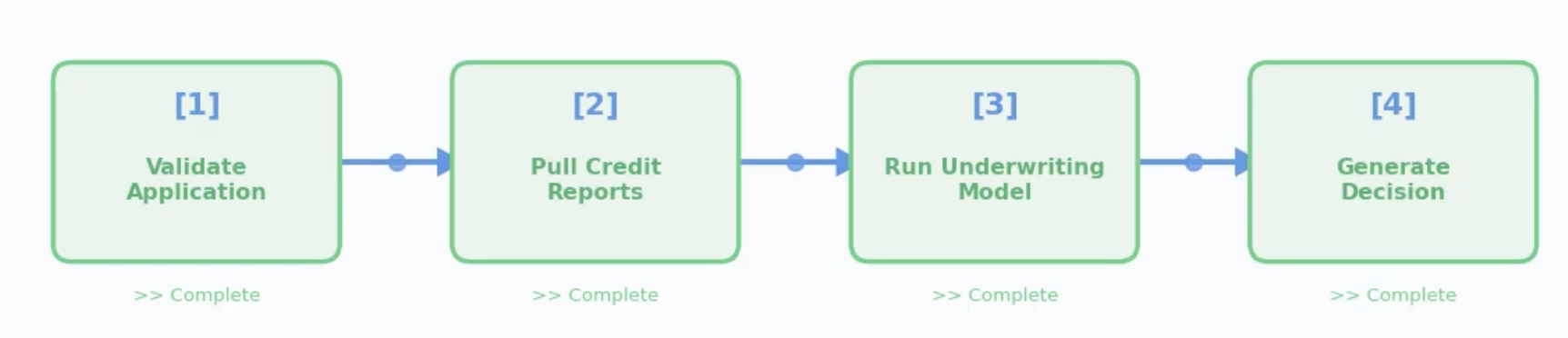
| Sequential | Steps run in order, each depends on the previous | Predictable but slow at scale | Loan approval: validate → credit check → decision |
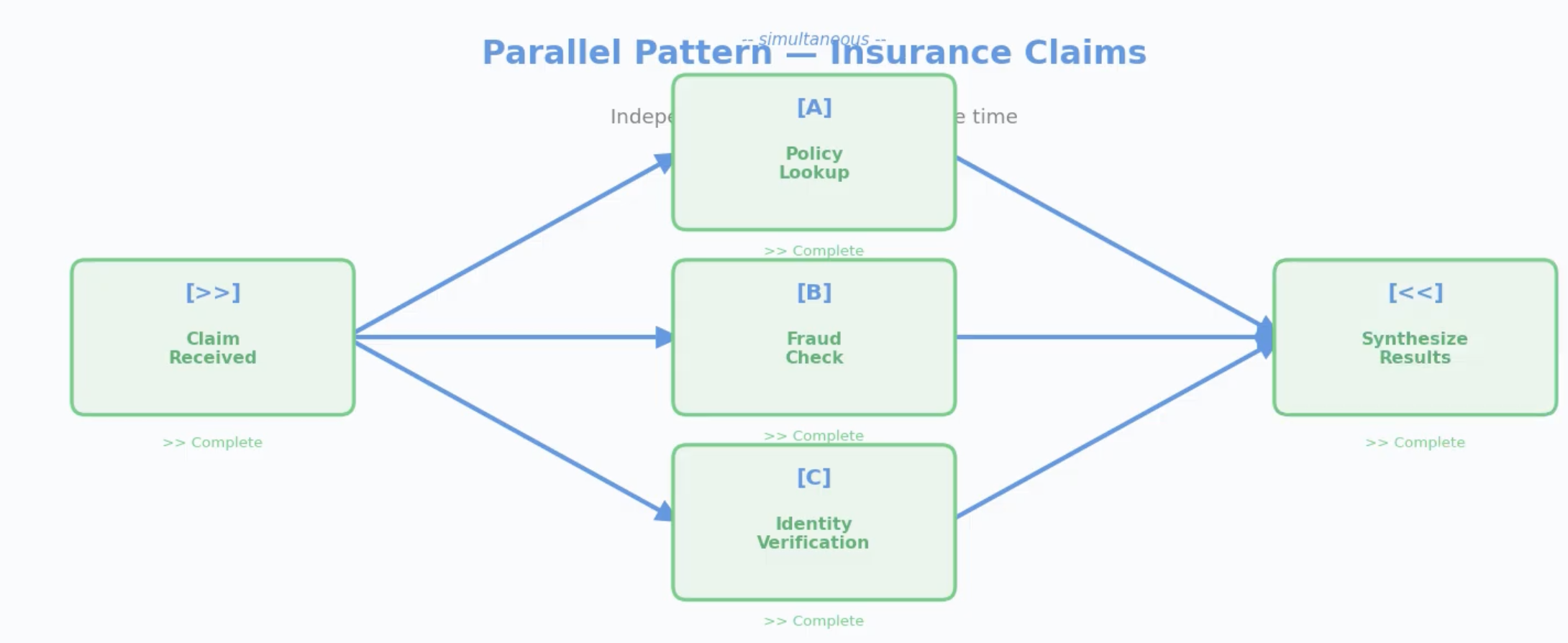
| Parallel | Independent tasks run simultaneously | Fast but must handle partial failures | Claims: pull policy + run fraud check + verify ID at once |
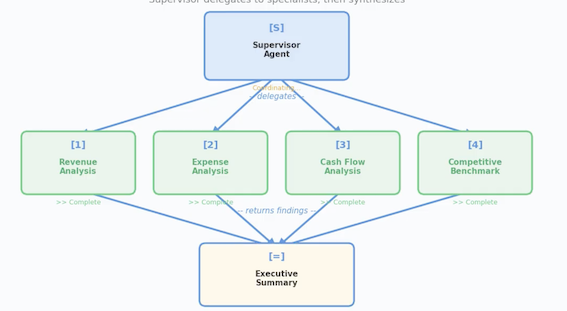
| Hierarchical | Supervisor delegates to specialist agents | Strong governance + scalable | Financial analysis: supervisor → revenue, expense, cash flow specialists |
| Dynamic | Agent reasons about what to do next at each step | Flexible but harder to audit | Ambiguous research: agent decides which tools to call based on findings |
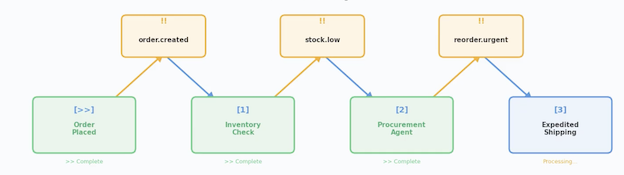
| Event-Driven | Agents react to business events (triggers) | Responsive but requires idempotency | Order placed → check inventory → reorder if low |
Sequential Pattern — Loan Approval
Each step depends on the previous step's output
Parallel Pattern - Insurance Claims
Hierarchical Pattern — Quarterly Performance
Supervisor delegates to specialists, then synthesizes
Event-Driven Pattern — Inventory Reorder
Events cascade and agents react
MULTI-AGENT SCENARIO: SUPPLY CHAIN REORDER
- Trigger - Inventory drops below threshold (Dataverse event)
- Supervisor agent receives alert, delegates three parallel tasks
- Demand agent — forecasts 90-day demand from sales data
- Supplier agent — checks lead times and pricing via MCP connector
- Budget agent — verifies spending authority in ERP
- Supervisor synthesizes results and recommends reorder quantity
- If order exceeds $50K → escalate to human buyer for approval
Exam Insight
Exam Insight: Best answers combine patterns — hierarchical at top, parallel within, human-in-the-loop for risk.
AGENT-TO-AGENT COMMUNICATION
| Method | How It Works | Best For |
|---|---|---|
| A2A protocol | Agents call each other directly through Foundry | Fast hand-offs between co-located agents |
| MCP-wrapped tools | Agent B exposed as an MCP tool — Agent A calls it like any tool | Security, auditability, policy enforcement |
| Shared Dataverse | Agent A writes results; Agent B reads them | Async workflows, audit trail, simpler architecture |
GOVERNANCE & RELIABILITY PATTERNS
| Pattern | What It Does | Example |
|---|---|---|
| Circuit breaker | Stops sending requests to a failing agent | Supplier agent fails 5x → stop calling, use cached data |
| Retry with backoff | Retries transient failures with increasing delays | API timeout → retry at 1s, 2s, 4s |
| Timeout | Caps wait time per step | If demand forecast takes >30s, escalate |
| Fallback | Uses a backup if primary fails | Primary model unavailable → use simpler rule-based logic |
| Observability | Logs every handoff, monitors latency, alerts on anomalies | Copilot Analytics + Application Insights |
KEY TAKEAWAYS
- Five patterns: sequential, parallel, hierarchical, dynamic, event-driven — know the tradeoffs
- Real-world solutions combine patterns (hierarchical + parallel + human-in-the-loop)
- AZA for speed, MCP for security, Dataverse for async and audit
- Governance patterns (circuit breakers, timeouts, fallbacks) prevent cascading failure
4-3 Designing Agents in Copilot Studio
TOPICS, TOOLS & FLOWS
| Building Block | Role | Example |
|---|---|---|
| Topics | What the agent understands — descriptions (generative) or trigger phrases (classic) + conversation flow | "Check order status" with input capture, tool call, response |
| Tools | Execute work — connectors, API calls, prompts, agent flows | Fetch order from Dynamics 365, send confirmation email |
| Flows | Orchestrate the sequence — branching, loops, error handling | Order found → show status; not found → escalate to human |
Exam Insight
Exam Insight: Topics handle intent, tools handle execution, flows hand! logic. Keep them separate for maintainability.
TOPIC ORCHESTRATION METHODS
| Method | How It Works | Best For |
|---|---|---|
| Classic NLU | Rule-based trigger phrases matched to topics | Simple, predictable intent matching with known phrases |
| CLU (Conversational Language Understanding) | ML model trained on labeled examples, recognizes intent + entities | Complex intent recognition across varied phrasing |
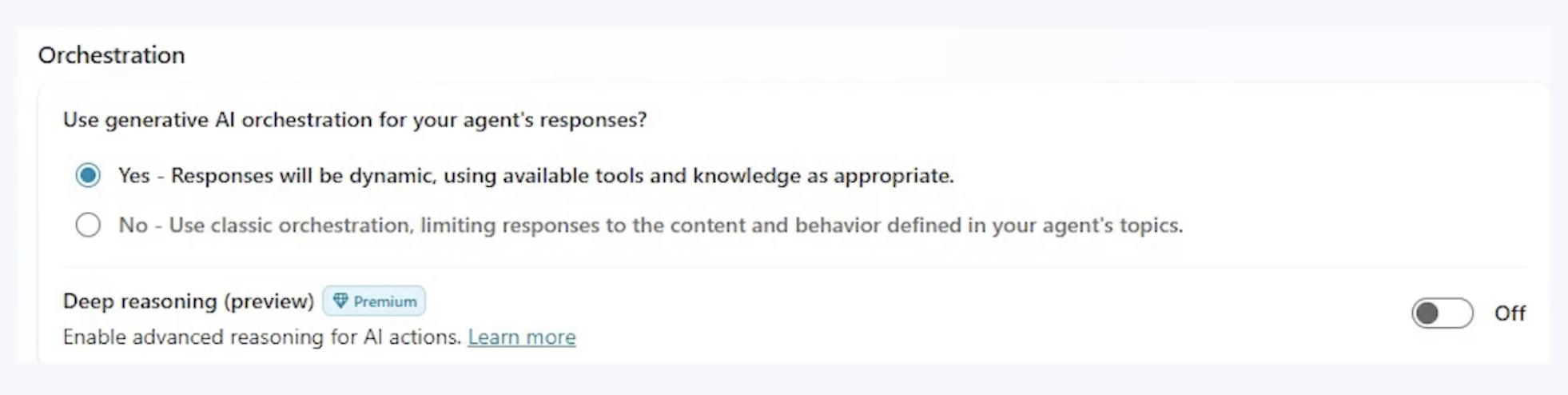
| Generative orchestration | LLM dynamically selects topics, tools, and knowledge based on context | Flexible, natural conversation where rigid matching fails |
Exam Insight
Exam Insight: Generative orchestration is the default for new agents. It lets the LLM reason about which topic or tool to invoke based on descriptions, rather than relying on fixed trigger phrases.
PROMPT ACTIONS
What: An action where the LLM itself is the tool — no API, no connector
How: Define inputs → write a prompt template → define expected output shape
Shine when you need to transform, summarize, classify, or generate structured content from unstructured input
Definition
Definition: Prompt actions let you use the LLM itself as a tool — just a well-crafted prompt that transforms input into structured output.
PROMPT ACTION EXAMPLES
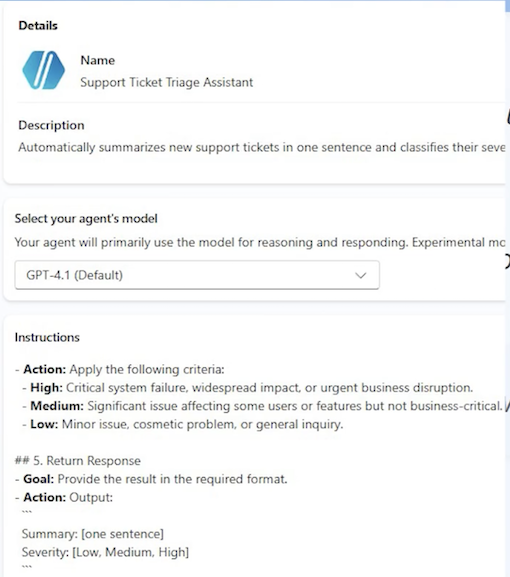
Support ticket triage:
"Given this support ticket: {ticket_text}, provide a one-sentence summary and classify severity as Low, Medium, or High."
Personalized recommendations:
"Based on this purchase history: {history), recommend three products the customer is likely to buy next. Return as a numbered list with brief reasons."
Fast to build, easy to iterate — you're editing a prompt, not writing code
Exam Insight
Exam Insight: Match agent type to task complexity. The exam penalizes over-engineering (autonomous for simple Q&A) and under-engineerin (prompt & response for multi-step workflows).
DESIGN EXAMPLE: IT SUPPORT AGENT
- Topic - "Password Reset" matched by description: "Handles password resets, account unlocks, and login recovery"
- Orchestration — Generative orchestration selects the topic from context
- Tool 1 — Verify employee identity via Entra ID connector
- Tool 2 — Trigger password reset through Power Automate agent flow
- Guardrail — If identity verification fails twice → escalate to help desk
- Response — "Your password has been reset. Check your email for instructions."
Agent type: Task agent — it completes a defined workflow with tools and error handling.
KEY TAKEAWAYS
- Topics handle intent, tools handle execution, flows handle logic - keep them separate
- Know the three orchestration methods: classic NLU, CLU, and generative orchestration
- Prompt actions turn the LLM itself into a tool — no API needed
- Three agent types: prompt & response, task, autonomous — match type to complexity
4-3 Copilot for Sales & Copilot for Service Design
COPILOT FOR SALES — WHAT IT DOES
| Capability | How It Works | Business Impact |
|---|---|---|
| Lead & opportunity scoring | Ranks leads using CRM data (engagement, deal stage) | Reps prioritize high-probability deals |
| Meeting preparation | Summarizes customer history, open issues, deal context | Prepared in 2 minutes, not 20 |
| Email drafting | Generates follow-ups grounded in deal details | 15-minute task becomes 2 minutes |
| Win/loss analysis | Identifies patterns across closed deals | Better coaching and forecasting |
Exam Insight
Exam Insight: Copilot for Sales spans D365, Outlook, and Teams — it bridges CRM and Microsoft 365.
COPILOT FOR SERVICE - WHAT IT DOES
Dynamics 365 Customer Service <——> Dynamics 365 Contact Center
| Capability | How It Works | Business Impact |
|---|---|---|
| Case summarization | Combines emails, calls, and chat into one summary | New reps pick up cases instantly |
| Resolution suggestions | Matches case to similar past cases and KB articles | Faster, more consistent resolution |
| KB article authoring | Drafts articles when reps solve novel issues | Captures knowledge automatically |
| Intelligent routing | Routes by issue type, urgency, and sentiment | Right agent first time |
Exam Insight: Copilot for Service integrates with D365 Contact Center - omnichannel routing across voice, chat, email, and social.
KEY BUSINESS TERMS FOR THE EXAM
- Pipeline — total value of open opportunities across all stages
- Opportunity - a qualified lead with defined revenue potential and stage
- Case — a customer issue tracked from creation to resolution
- SLA (Service Level Agreement) — contractual response/resolution time targets
- CSAT (Customer Satisfaction) — post-interaction satisfaction score
- First Contact Resolution (FCR) — percentage of cases resolved without escalation
Definition
Definition: The exam uses these terms in scenario questions. "A company's CSAT dropped 15% — which Copilot capability addresses this?" Answer: intelligent routing + resolution suggestions.
EXTENDING SALES & SERVICE COPILOTS
Exam Insight: Extend progressively: configure first → Copilot Studio for logic → connectors for data → Power Automate for cross-app flows.
| Extension Level | How | Sales Example | Service Example |
|---|---|---|---|
| Configure | Settings & field mapping | Custom fields in meeting prep | VIP routing rules |
| Copilot Studio | Topics + tools | Credit check before qualification | Sentiment-triggered escalation |
| Connectors | External data | Enrich leads (D&B data) | Pull warranty from ERP |
| Power Automate | Cross-app flows | Deal approval workflow | SLA breach alerts |
DESIGN EXAMPLE: B2B SALES PIPELINE AGENT
- Trigger — Opportunity moves to "Proposal Sent" stage in D365 Sales
- Copilot Studio topic — "Proposal Follow-Up" activates
- Action 1 — Pull customer stakeholder map from Dataverse
- Action 2 — Enrich with latest engagement data from Outlook (via Sales connector)
- Prompt action — "Summarize this stakeholder's concerns and draft a personalized follow-up"
- Guardrail — If deal value >$500K, require manager review before sending
- Result — Rep gets a ready-to-send follow-up in 2 minutes, manager reviews large deals
KEY TAKEAWAYS
- Copilot for Sales spans D365 + Outlook + Teams — it accelerates pipeline, prep, and follow-up
- Copilot for Service integrates with Contact Center for omnichannel case resolution
- Know the business terms: pipeline, opportunity, case, SLA, CSAT, FCR
- Extend progressively: configure → Copilot Studio → connectors → Power Automate
4-4 Copilot for Sales & Copilot for Service Design
FINANCE COPILOT CAPABILITIES
| Capability | What It Does | Design Consideration |
|---|---|---|
| Invoice Matching | 3-way match: invoice → PO → receipt | Auto-approve exact; flag variances |
| Anomaly Detection | Flags unusual amounts, duplicates | Tune thresholds, manage false positives |
| Compliance & Fraud | Checks spending rules, vendor blacklists | Audit trail + human review |
| Accrual Recording | Automates month-end accrual entries | Validate accuracy before posting |
| Variance Analysis | Compares actuals to budget | Configurable tolerance thresholds |
Exam Insight: Finance scenarios test invoice matching + escalation design — know audit trails and approval thresholds.
SUPPLY CHAIN COPILOT CAPABILITIES
| Capability | What It Does | Design Consideration |
|---|---|---|
| Stockout Prediction | Forecasts shortfalls before they happen | Demand data quality, lead-time accuracy |
| Quality Flagging | Detects abnormal defect rates | Threshold config, supplier notification |
| Logistics Optimization | Consolidates shipments, optimizes routes | Cost vs. speed trade-offs |
| Inventory Monitoring | Tracks slow/fast-moving SKUs | Auto-reorder triggers, disposal alerts |
Exam Insight
Exam Insight: SCM agents are autonomous and event-driven — expect questions on confidence thresholds and escalation rules.
CROSS-MODULE ORCHESTRATION EXAMPLE
Scenario: Customer reports a defective product
- Service — Copilot creates case, verifies warranty, determines replacement covered
- Supply Chain — Agent checks nearest warehouse inventory, initiates shipment
- Finance — Agent creates credit memo, schedules vendor chargeback
- Service - Case updated with tracking number, customer notified proactively
Key: Dataverse is the shared backbone — every handoff is logged and auditable.
Exam Insight
Exam Insight: Cross-module scenarios test governance at every handoff — audit trails, error handling, and human escalation.
AGENT CHAT & KNOWLEDGE SOURCES IN F&O
- F&O apps support agent chat — users ask questions about data directly in Finance or SCM
- Extend agents with custom knowledge sources: internal policies, compliance guides, SOPS
- In-app help can be grounded in custom KB articles for role-specific guidance
- Map knowledge sources to roles: AP clerk needs invoice policies, planner needs procurement rules
Exam Insight: Know that F&O agent chat supports custom knowledge sources — the exam tests this as an extension point.
KEY TAKEAWAYS
- Finance Copilot automates invoice matching, anomaly detection, and compliance — w audit trails
- Supply Chain Copilot runs autonomously: stockout prediction, quality flagging, logistic optimization
- Cross-module orchestration across D365 apps uses Dataverse as the shared backbone
- F&O agent chat can be extended with custom knowledge sources for role-specific guidance
4-5 Microsoft 365 Copilot & Teams Agent Design
M365 COPILOT EXTENSIBILITY MODEL
| Extension Type | What It Does | Best For |
|---|---|---|
| Copilot Studio plugin | Custom agent as plugin in Teams/Outlook | Multi-step workflows, external queries |
| Declarative agent | Manifest-defined, no code, scoped instructions | Focused Q&A, policy lookup |
| Graph connector | Exposes external data through Microsoft Graph | Non-M365 data in Copilot search |
| Message extension* | Card-based actions in Teams compose box | Quick lookups, approvals |
Exam Insight: Simple Q&A → declarative agent.
External data → Graph connector.
Multi-step logic → Copilot Studio plugin.
DECLARATIVE AGENTS
Manifest-defined — JSON file specifies instructions, knowledge sources, and capabilities
{
  "schema": "https://developer.microsoft.com/json-schemas/copilot/declarative-agent/v1.6/schema.json",
  "version": "v1.6",
  "name": "HR Policy Assistant",
  "description": "Answers employee questions about company HR policies, benefits, leave, and workplace guidelines",
  "instructions": "You are an HR policy assistant for Contoso Corporation. Answer questions about company policies",
  "conversation_starters": [
    {
      "title": "Leave Policy",
      "text": "How many vacation days do I accrue per year?"
    },
    {
      "title": "Benefits Enrollment",
      "text": "when is the next open enrollment period for health insurance?"
    },
    {
      "title": "Parental Leave",
      "text": "what is our parental leave policy?"
    },
    {
      "title": "401(k) Match",
      "text": "what is the company 401(k) match percentage?"
    }
  ],
  "capabilities": [
    {
      "name": "OneDriveAndSharePoint",
      "items_by_url": [
        {
          "url": "https://contoso.sharepoint.com/sites/HRPolicies"
        },
        {
          "url": "https://contoso.sharepoint.com/sites/Benefits/Documents"
        }
      ]
    },
    {
      "name": "GraphConnectors",
      "connections": [
        {
          "connection_id": "contosoHRIS"
        }
      ]
    }
  ]
}
DECLARATIVE AGENTS
- Manifest-defined — JSON file specifies instructions, knowledge sources, and capabilities
- No custom code required — configuration only, deployed through Teams admin
- Scoped behavior — agent only answers within its defined domain
- Knowledge sources — SharePoint sites, specific files, web URLs
- Capabilities — can enable/disable code interpreter, image generation, Graph skills
GRAPH CONNECTORS & EXTERNAL DATA
| Design Element | How It Works |
|---|---|
| Connection | Adapter maps external data (HRIS, contracts, wikis) into Microsoft Graph |
| Schema | You define properties, labels, and content fields for each item |
| Item-level ACL | Each item carries access control — Copilot only returns items the user can see |
| Semantic labels | Mark fields as title, body, or URL so Copilot understands structure |
| Freshness | Schedule crawls or push updates to keep data current |
Exam Insight: Graph connectors must implement item-level access control. Without it, Copilot could surface confidential data to unauthorized users.
M365 AGENT SECURITY & GOVERNANCE
- Sensitivity labels — classify data as Public, Internal, Confidential, or Restricted
- DLP policies — prevent agents from surfacing restricted data
- Conditional access — enforce device, location, and compliance requirements
- Audit logging — every interaction logged: who asked, what was retrieved
- Responsible AI — test for hallucinations and bias before deployment
Exam Insight: Governance depends on sensitivity labels + DLP. If data isn't classified, Copilot can't enforce access boundaries.
DESIGN EXAMPLE: HR AGENT IN TEAMS
| Step | What Happens |
|---|---|
| 1. Graph connector | Connect to HRIS with row-level security |
| 2. Knowledge sources | Index HR policy docs in SharePoint |
| 3. Declarative agent | Manifest scopes agent to HR domain |
| 4. Deploy to Teams | Employees ask questions in chat |
Goal: Reduce repetitive HR queries (leave balance, benefits, policies)
4-6 Grounding, Knowledge Sources & Data Processing
WHAT IS GROUNDING & WHY IT MATTERS
- Grounding = anchoring responses in real company data, not general training knowledge
- Without grounding: agent guesses → hallucinations → lost trust
- With grounding: agent retrieves facts first, then generates → accurate, cited responses
- RAG pattern: Retrieve context → Augment the prompt → Generate grounded answer
KNOWLEDGE SOURCE OPTIONS
| Source | Best For | Governance |
|---|---|---|
| Dataverse | Structured real-time queries (orders, balances) | Built-in RBAC |
| SharePoint / OneDrive | Documents, policies, compliance docs | Sensitivity labels, DLP |
| Azure AI Search | Large doc sets, semantic retrieval | Purview integration |
| Microsoft Graph | Cross-app M365 context (email, files) | M365 security stack |
| Custom APIs / MCP | Legacy systems, proprietary data | MCP for secure access |
Exam Insight:
Structured real-time → Dataverse.
Unstructured docs → Azure AI Search.
M365 context → Graph.
Legacy → MCP-wrapped APIs.
COPILOT STUDIO KNOWLEDGE CONFIGURATION
| Knowledge Type | Connects To | When to Use |
|---|---|---|
| Public websites | External URLs crawled and indexed | Product docs, FAQs |
| SharePoint sites | Specific sites or libraries | Internal policies, procedures |
| Dataverse tables | Structured records | Customer data, case history |
| Uploaded files | PDFs, Word, Excel | Small doc sets, prototyping |
| Microsoft Graph | User's M365 data | Personalized context |
Combine multiple types in one agent — the orchestrator searches all sources and returns the most relevant results.
DATA PROCESSING — CHUNKING, EMBEDDING & SEARCH
- Chunking — split documents into focused segments (paragraphs, sections) for precise retrieval
- Embedding — convert chunks into vectors; similar meaning = similar vectors
- Hybrid search — combine vector (semantic) + keyword (exact match) for best accuracy
Exam Insight
- Exam Insight: Vector search finds semantically similar content even when wording differs.
- Hybrid search (vector + keyword) gives the best accuracy
- Azure AI Search provides this out of the box.
DATA PROCESSING — QUALITY, FRESHNESS & SCHEMA
Data cleaning — remove duplicates, outdated versions before indexing;
garbage in = garbage out
Freshness — schedule re-crawls or push updates;
stale data = wrong answers
Schema design — apply semantic labels (title, body, URL) to help the model understand structure and produce citations
Exam Insight: Data quality and freshness are design decisions, not afterthoughts. An agent citing outdated policies is worse than no agent.
RAG ARCHITECTURE & VERIFICATION
Retrieval-Augmented Generation flow:
- Query — user asks a question
- Retrieve — search knowledge sources for top 3-5 relevant chunks
- Re-rank - score by relevance and recency
- Augment — inject context into prompt: "Answer based on this context only"
- Generate — LLM produces a grounded response
- Cite — attach source references (doc, section, page)
- Verify - check: is the answer consistent with retrieved context?
Citation and verification are required. Designs must include source attribution and confidence thresholds — low confidence should trigger escalation.
IT SUPPORT AGENT — EXAMPLE RESPONSE
"Your VPN drops when switching networks. Per Runbook IT-2024-VPN, section 3: reset your network adapter. Source: IT Runbook, updated March 2025."
Key design points:
- Every response cites a specific source document and section
- Confidence below 70% triggers escalation instead of guessing
- Fallback: "I can't find an answer — creating a ticket for you"
KEY TAKEAWAYS
- Grounding prevents hallucination — every agent must retrieve real data before generating answers
- Choose knowledge sources by data type: Dataverse for structured, Azure AI Search for documents, Graph for M365 context
- Data processing matters: chunk for precision, embed for semantic search, manage freshness so answers stay current
- RAG architecture must include citation and verification — if the agent isn't confident, escalate rather than guess
4-7 Extensibility: MCP, UI Automation and RPA & Agent Behaviors
MODEL CONTEXT PROTOCOL (MCP) OVERVIEW
The problem: agents calling APls directly → exposed keys, no audit trail, doesn't scale
MCP adds a middleman between agents and services:
- Agent asks MCP → MCP checks permissions, validates input, enforces rate limits
- MCP forwards to the actual service and logs the entire interaction
Three advantages:
- Security — agents never see API keys
- Auditability — every request logged with user context and timestamp
- Interoperability — shared tools across Copilot Studio, Foundry, and custom apps
MCP DESIGN GUIDANCE
- Register tools as MCP servers in Azure
- Standardize tool schemas so any agent can call them
- Use context passing with A2A to share session state during handoffs
Exam Insight
When the exam says "securely integrate with a legacy system" or "ensure compliance with full traceability" — MCP is almost always the answer.
REST API TOOLS & SKILLS
REST API tools — define custom HTTP endpoints directly in the agent
- Provide an OpenAPI spec, configure auth, the agent calls it as a tool
- Simpler than MCP for single, straightforward integrations
Skills — prebuilt, reusable AI building blocks
- Entity extraction, document summarization, language translation
- Snap into any agent without building from
Exam Insight
Simple, direct API access for one agent? REST API tool. Secure, shared, auditable access across multiple agents? MCP.
UI AUTOMATION AND RPA IN COPILOT STUDIO
- Agents interact with Uls: click buttons, type text, read screens
- For legacy system automation where no API exists
- Currently in preview — expect exam questions on guardrails
Guardrails:
- Whitelist allowed actions (specific buttons, fields)
- Require user confirmation for sensitive operations
- Define safe action boundaries and timeouts
Exam Insight
MCP when APls exist. Ul Automation and RPA only when no API is available — always with whitelisted actions, user confirmation, and
AGENT BEHAVIORS IN COPILOT STUDIO
Beyond APIs and MCP — configure how agents think and interact
Four key behaviors tested on the exam:
- Reasoning mode — chain-of-thought for complex, multi-step problems
- Voice mode — spoken interaction via phone or Teams
- Autonomous triggers — event-driven actions without user prompt
- Generative answers — LLM fallback when no topic matches
Every behavior must be grounded in real data
AGENT BEHAVIORS — AUTONOMOUS TRIGGERS & GENERATIVE ANSWERS
- Example: supply chain agent detects stockout → auto-triggers reorder
- Requires confidence thresholds and escalation rules
- No human in the loop — guardrails are essential
Generative answers — LLM fallback when no topic matches
- Agent uses the language model to generate a response
- Must be grounded — configure which knowledge sources it can pull from
- Ungrounded generative answers = hallucinations
KEY TAKEAWAYS
- MCP enables secure, auditable tool access — agents never see API keys, every call is logged. REST API tools and Skills offer lighter-weight alternatives for simpler scenarios
- UI Automation and RPA automates legacy Uis when no API exists — always pair with whitelisted actions, user confirmation, and timeouts
- Agent behaviors (reasoning, voice, autonomous, generative) expand capabilities — all must be grounded in real data
- Exam decision rule: Simple API call → REST API tool. Shared/auditable access → MCP. No API → Ul Automation and RPA with guardrails. Complex logic → reasoning mode. Spoken interaction → voice mode
4-8 Will Architected for AI Solutions
responsible AI Will Architected
- Reliability
- Operational Excellence
- Performance Efficiency
- Cost Optimization
- Security
WHY WELL-ARCHITECTED MATTERS FOR AI
Power Platform WAF adapts Azure WAF to agentic AI solutions
Five pillars + Responsible AI = the complete design lens
The exam presents scenarios and asks: "Which pillar is most at risk?"
Strong answers apply multiple pillars — especially Security + Responsible AI together
Exam Insight
WAF questions are scenario-based.
You'll see a design and choose which principle to prioritize.
Expect Security, Responsible AI, and Reliability most often.
WAF PILLARS FOR AGENTIC AI
| Pillar | Key AI Considerations | Exam Clue |
|---|---|---|
| Reliability | Uptime, retry logic, fallback | "Agent fails intermittently" |
| Security | Data leakage, prompt injection, over-privileged agents | "Protect sensitive data" |
| Cost Optimization | Token spend, unnecessary model calls | "Reduce costs at scale" |
| Operational Excellence | Monitoring, alerting, CI/CD | "Track performance over time" |
| Performance Efficiency | Latency, throughput | "Agent too slow" |
| Responsible AI | Fairness, transparency, accountability, safety | "Avoid bias in decisions" |
RELIABILITY PATTERNS
- Retry with exponential backoff — 1s, 2s, 4s; don't hammer a struggling service
- Circuit breakers — stop calling failed services; switch to fallback (cached data, human escalation)
- Graceful degradation — use basic data when premium unavailable; keep the agent functional
Exam Insight
"Agent fails intermittently" → Reliability. Look for retry logic, fallback behavior, and graceful degradation in answer choices.
SECURITY PATTERNS
- Least privilege — agent sees only what the current user is authorized for
- MCP wrapping — agents never hold API keys directly
- Prompt injection defense — validate and sanitize inputs before processing
Exam Insight
Reliability + Security work together.
Circuit breakers prevent cascading failures.
MCP prevents credential exposure. Both must be in the design.
COST OPTIMIZATION
- Model routing — small, fast models for simple tasks; route complex queries to powerful models
- Caching — retrieve grounding data once, reuse across requests
- Batch processing — 1,000 items in one call, not 1,000 individual calls
Exam Insight
"Reduce costs at scale" → Cost Optimization. Look for model routing, caching, and batch processing in answer choices.
OPERATIONAL EXCELLENCE & PERFORMANCE
Operational Excellence:
- Dashboards: latency, error rate, escalation rate, token consumption
- Alerts when metrics spike; runbooks for common failures
Performance Efficiency:
- Parallel execution for independent steps
- Async notifications (don't block on email/SMS)
- Optimized retrieval: 3-5 relevant chunks, not 100
RESPONSIBLE AI — THE AI-SPECIFIC LAYER
- Fairness — audit models for bias by protected characteristics
- Transparency — explain decisions in plain language
- Accountability - log every decision; assign human owners for AI outcomes
- Safety — content filters + human review for high-stakes decisions
Exam Insight
Responsible AI is tested alongside other pillars. A loan system needs Security (protect credit data) AND Responsible AI (no bias). The best answer addresses both.
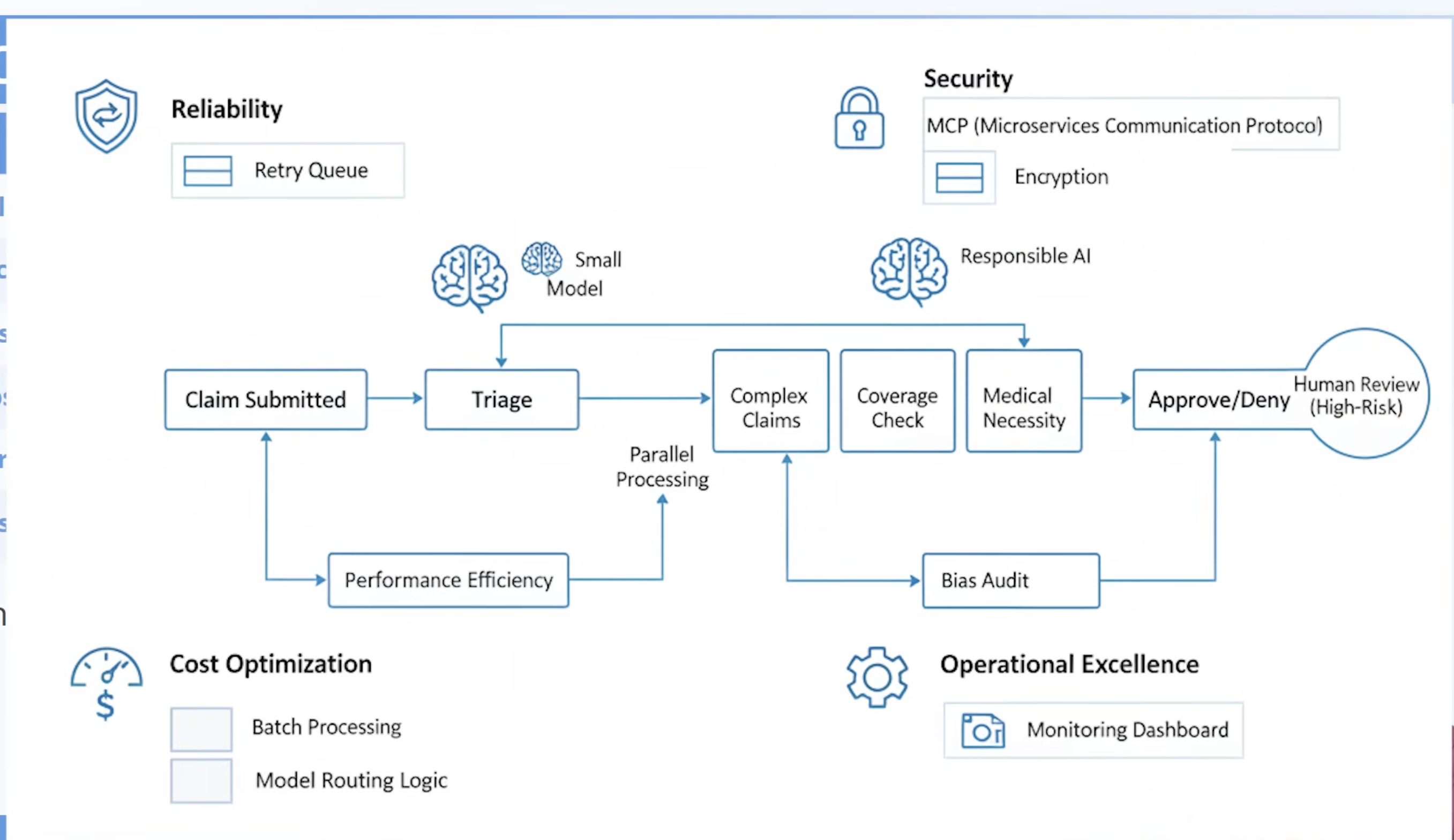
SCENARIO: HEALTH INSURANCE CLAIMS AGENT
Reliability:
- Queue + retry if model down;
- auto-approve low-risk, escalate high-risk
Security:
- Claims via MCP;
- PII encrypted;
- role-based patient access
Cost:
- Batch hourly;
- cheap model for triage, expensive for complex
Ops Excellence:
- Dashboard: claims/hour, error rate;
- alert on escalation spikes
Performance:
- Validation,
- coverage,
- necessity run in parallel
Responsible AI:
- Monthly bias audit on denials;
- explanations + appeal instructions
This is what the exam expects: applying all six lenses to one design.
AI ACROSS POWER PLATFORM
Generative pages & agent feed (model-driven apps)
- AI dynamically renders content — low-code or code-first (React / PCF)
- Agent feed surfaces AI activity in the app sidebar
- WAF: Performance Efficiency + Responsible AI (content must be grounded)
Power Platform AI hub (admin dashboard)
- Visibility into models, token consumption, and policy compliance
- WAF: Operational Excellence + Cost Optimization
Exam Insight
"Track AI usage across teams" → AI hub. "Custom AI in a model-driven app" → generative pages.
AI BUILDER & COPILOT CONTROL IN CANVAS APPS
AI Builder components — prebuilt AI for structured tasks:
- Text recognition, sentiment analysis, object detection, form processing
- Use when the task is repeatable and well-defined
Copilot control — embedded conversational AI in canvas apps
- Use when users need freeform, conversational help
WAF connections:
- Security — data processed by AI models must follow DLP policies
- Cost — AI Builder consumes credits; plan capacity and monitor usage via AI hub
KEY TAKEAWAYS
- Five pillars plus Responsible AI — address all six in every agentic design, not just the ones that seem most interesting
- Reliability and Security are the most critical for agents that call external services — circuit breakers and MCP are must-haves
- Cost Optimization matters at scale — use model routing, caching, and batch processing to control token spend
- Responsible AI is not a feature, it's a foundation — fairness, transparency, accountability, and safety apply to every agent that makes or influences decisions
- Generative pages, AI hub, and AI Builder in canvas apps all connect back to WAF design with performance, security, cost, and responsible AI in mind
4-9 Designing Custom Models in Microsoft Foundry
WHEN TO USE CUSTOM MODELS
Exam Insight
Exam Insight: The exam tests when custom models are justified versus when prebuilt models suffice.
Start with prebuilt.
Fine-tune for domain accuracy.
Go fully custom only when the business case justifies the investment.
| Scenario | Recommended Approach | Rationale |
|---|---|---|
| Standard Q&A, summarization | Prebuilt model (GPT-40, etc.) | Fast, no training needed |
| Domain-specific language (legal, medical) | Fine-tuned model | Better accuracy on specialized terms |
| Proprietary classification or prediction | Custom-trained model | Unique to your data and business logic |
| Cost-sensitive high-volume tasks | Small language model (SLM) | Lower token cost, faster inference |
FOUNDRY MODEL CATALOG
- Model catalog: browse & deploy from Microsoft, OpenAl, Meta, Mistral, and others
- Match model to task requirements, latency, and budget
DEVELOPMENT TOOLS
| Tool | Purpose | Use When |
|---|---|---|
| Prompt Flow | Visual prompt prototyping & pipelines | Rapid experimentation |
| Evaluation | Test against labeled datasets | Measuring accuracy, latency, bias |
| Fine-tuning | Train base model on domain data | Domain-specific accuracy needed |
| Deployment | Managed endpoint with scaling & monitoring | Production readiness |
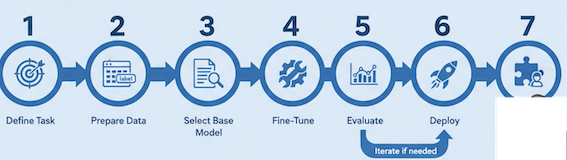
DESIGN WORKFLOW — DEFINE, PREPARE & FINE-TUNE
- Define the task — classification, extraction, generation, or prediction
- Prepare training data — labeled, high-quality, representative, bias-free
- Select base model - match model size to task complexity from the catalog
- Fine-tune — train on your domain data; Foundry manages compute
- Evaluate — test against held-out data; measure accuracy, latency, bias
- Deploy — publish as managed endpoint with auto-scaling and access controls
- Integrate — connect to agents via MCP or Copilot Studio actions; add monitoring
CONNECTING CUSTOM MODELS TO AGENTS
- Copilot Studio: Use custom model as an action (API call to Foundry endpoint)
- Model routing: Route simple requests to SLMs, complex to custom or large models
- Multi-model pipelines: Chain models — one extracts, another classifies, a third generates
- Governance: Version models, audit predictions, monitor drift over time
KEY TAKEAWAYS
- Use custom models only when prebuilt models can't meet domain, accuracy, or cost requirements — the exam rewards pragmatism
- Foundry provides end-to-end tools: model catalog, prompt flow, fine-tuning, evaluation, deployment, and monitoring
- Connect custom models to agents via MCP or Copilot Studio actions and use model routing for cost optimization
- Govern custom models with versioning, prediction auditing, and drift monitoring - production models degrade over time without oversight
2 Introduction to agentic AI business solutions
AI Transformation Framework
- Define business goals
- Develop AI strategy
- Design architecture
- Implement solutions
- Monitor and optimize performance

Best Practices for AI Architects
- Start with business outcomes focusing on measurable impact.
- Adopt modular design for flexibility and scalability.
- Prioritize Responsible AI principles: fairness, transparency, accountability.
- Collaborate across teams: data scientists, developers, business leaders.
- Leverage Azure AI services for speed and reliability.
Scaling AI Across the Enterprise
- Automation to streamline deployment and monitoring.
- Standardization using common frameworks and tools.
- Continuous learning enabling models to evolve with new data.
- User training to foster a culture of continuous learning.
Overview of Microsoft AI Technologies
- Microsoft AI technologies empower organizations to build intelligent solutions
- Enhance productivity, improve decision-making, and deliver measurable business value
- Introduces key Azure AI services, development tools, and Copilot solutions
- Tools help businesses innovate, automate, and scale processes
- Support measurable outcomes and enhanced collaboration
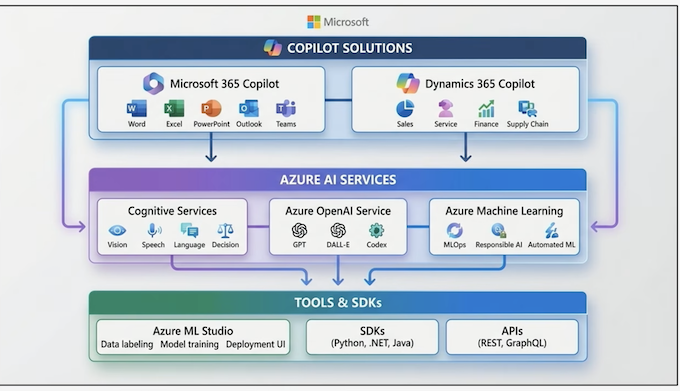
Core Components of Microsoft AI Technologies
- Azure AI Services: Azure Machine Learning, Azure OpenAl Service, Azure Foundry
- Tools and SDKs: Azure Machine Learning Studio, SDKs, APIs, CLI, REST APIs
- Microsoft Copilot Solutions: Embedded AI in Microsoft 365 and Dynamics 365
- Copilot automates tasks, generates content, and provides actionable insights
- Enhances productivity across business processes
Phase-by-phase guidance
| Phase | Goals | Key activities | Outputs |
|---|---|---|---|
| Azure AI Services | Provide AI capabilities via APIs and platforms | Develop, train, deploy AI models; access generative AI | Prebuilt APIs, ML models, generative AI services |
| Tools and SDKs | Enable AI integration and automation | Use SDKs, APIs, CLI, REST APIs for development and workflows | Visual interfaces, multi-language SDKs, automation tools |
| Copilot Solutions | Embed AI to enhance productivity | Automate tasks, generate content, provide insights | Improved business process efficiency and insights |
Microsoft AI Ecosystem
Best Practices for Business Value
- Start with measurable business outcomes
- Implement AI responsibly: fairness, reliability, safety, privacy, security, inclusiveness, transparency, accountability
- Leverage cloud scalability for enterprise-wide adoption
Identify Out-of-the-Box (OOB) Microsoft AI Agent & Resources
Overview
- Microsoft offers out-of-the-box AI agent resources to accelerate AI implementation.
- Resources include prebuilt agents, templates, and tools integrated vith Azure AI and Copilot Studio.
- These agents reduce development time, ensure compliance, and enable enterprise scalability.
Microsoft AI Agent Ecosystem
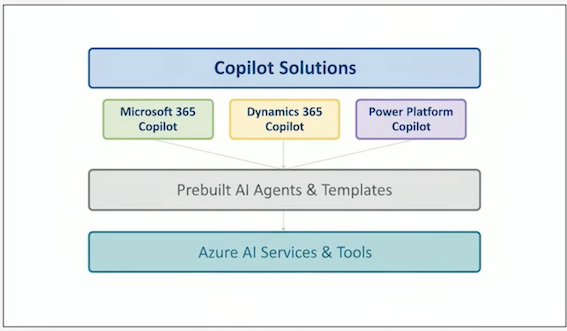
OOB AI Agent Resources
- Prebuilt Agents: Automate common business workflows
- Copilot Studio: Customize and deploy AI agents
- Azure AI Services: Vision, Speech, Language, Decision-making capabilities
- Scenario Library: Best practices and adoption guides
Best Practices
- Start with business outcomes before selecting tools
- Use prebuilt agents for quick deployment
- Ensure Responsible AI principles: Fairness, Reliability and Safety, Privacy and Security, Inclusiveness, Transparency, Accountability
- Leverage Azure AI for scalability and compliance
Summary
Introduction to Agentic AI Business Solution Architecture
- Explain the architect's role in driving AI adoption and transformation.
- Identify key responsibilities of an AI architect in business contexts.
- Understand how architects align AI solutions with organizational goals.
- Apply best practices for scaling AI across enterprise environments.
- Identify core Microsoft AI services and tools.
- Explore Microsoft Copilot solutions and their business value.
- Understand how generative AI unlocks productivity in enterprise environments.
- Identify OOB Microsoft AI agent resources available for business solutions.
3 Analyze requirements for AI-powered business solutions
3-1 Assess the Use of Agents in Task Automation, Data Analytics, and Decision-Making
Overview
Introduction to AI agents and Microsoft Copilot capabilities
- AI agents automate repeatable tasks and provide data-driven insights
- Support decision-making by integrating enterprise context with generative AI
- Microsoft Copilot integrates AI capabilities into tools like Word, Outlook, Teams,Dynamics 365
- Generative AI accelerates productivity by drafting content and enabling natural language interaction
- Creates original content including text, images, videos, audio, and software code
Key activities
Role of Agents in Task Automation
- Draft documents, emails, or responses based on context
- Summarize large volumes of data such as emails, meetings, and chats
- Automate workflows using Microsoft 365, Copilot Studio, Azure Foundry, and PowerPlatform
- Trigger multi-step processes including approvals, notifications, and content generation
- Reduce cognitive load to focus teams on strategic work
Phase-by-phase guidance
Examples of Agent-Driven Task Automation
| Task Area | How Agents Help | Tools |
|---|---|---|
| Communication | Draft emails, summarize Teams threads, create meeting recaps | Microsoft 365 Copilot |
| Documentation | Generate first-draft reports, rewrite or optimize content | Word, OneNote, Loop, Microsoft 365 Copilot |
| Process Automation | Trigger workflows and multi-step tasks | Copilot Studio, Power Automate |
| Knowledge Retrieval | Answer questions using enterprise data | Copilot Search, Graph grounding |
AI Agents in the Analytics Workflow
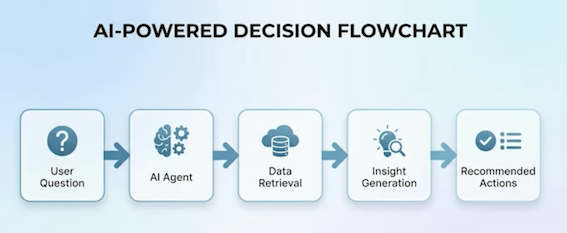
Key activities
Agents in Decision-Making
- Support strategic and operational decisions with AI input Provide scenario recommendations based on historical data
- Identify risks through pattern recognition
- Summarize business context from documents, meetings, and datasets
- Offer recommendations backed by enterprise knowledge
→ Enables leaders to explore alternatives and evaluate impacts confidently
Best practices
Using AI Agents Effectively and Responsibly
- Start with the business outcome you want to improve
- Use agent automation to reduce repetitive work, not replace critical thinking
- Maintain responsible AI principles: Fairness, Reliability and Safety, Privacy and Security,Inclusiveness, Transparency, Accountability
- Monitor performance and refine prompts, workflows, and data inputs
- Empower teams with training to use Copilot effectively
→ These Principles reinforce reliable, secure AI adoption at scale
Review Data for Grounding (Accuracy, Relevance, Timeliness, Cleanliness, Availability)
Overview
Understanding grounding in AI agents
- Grounding ensures AI agents use trusted, domain-specific organizational data to increase accuracy and reduce hallucinations
- Microsoft Copilot and Copilot Studio use semantic indexing across Microsoft Graph for precise content retrieval
- AI systems must connect to approved, access-controlled data to produce trustworthy outcomes
- Copilot Retrieval API fetches relevant text from SharePoint, OneDrive, and connected sources respecting user permissions
Key activities
Evaluating grounding data quality dimensions
- Assess data accuracy by verifying facts with SMEs and authoritative sources
- Ensure relevance by matching data to the agent's intended use case and business domain
- Maintain timeliness by updating data regularly and reflecting latest documents and policies
- Improve cleanliness by removing duplicates, irrelevant metadata, and ensuring clear structure
- Confirm availability by managing access controls and indexing in Microsoft Graph
Dimension 1: Accuracy
Evaluating grounding data quality dimensions
- Data should reflect real, verifiable facts. Inaccurate content leads to incorrect or harmful agent outputs.
- AI agents must use trusted and validated datasets during retrieval to avoid generating incorrect responses.
Indicators of accuracy:
- Verified by SMEs
- Matched to authoritative sources
- Free from errors or outdated assumptions
Dimension 2: Relevance
Evaluating grounding data quality dimensions
- Grounding data must match the intended use case of the agent.
- When data is irrelevant, semantic search may retrieve conceptually similar—but contextually wrong-content.
Relevance ensures the model surfaces information alianed with the user's scenario, workflow, or business domain.
Dimension 3: Timeliness
Evaluating grounding data quality dimensions
- AI outputs degrade when data is stale.
- The semantic index in Microsoft 365 continuously updates as content changes, ensuring the grounding layer reflects the latest documents, conversations, and knowledge.
Timeliness includes:
- Modified dates
- Seasonal or compliance-related updates
- Data refresh schedules
Dimension 4: Cleanliness
Evaluating grounding data quality dimensions
- Clean data reduces noise and increases retrieval precision.
- Data Pollution in AI refers to the degradation of data quality that negatively impacts the performance and reliability of AI systems.
Clean data characteristics:
- Clear structure
- No duplicates
- Minimal irrelevant metadata
- Stable formatting and predictable layout
Cleaner data improves embedding quality and helps the agent retrieve the most appropriate content.
Dimension 5: Availability
Evaluating grounding data quality dimensions
Agents can only ground responses from data the user has access to. The Retrieval API respects permissions and will not return content beyond a user's access scope.
Availability depends on:
- Storage in SharePoint/OneDrive or connected systems
- Proper indexing in Microsoft Graph
- Clear access controls
Phase-by-phase guidance
Dimensions of grounding data quality
| Dimension | Definition | Impact on Agent Performance |
|---|---|---|
| Accuracy | Data is correct and verified | Reduces hallucinations and misinformation |
| Relevance | Data aligns to the task/intent | Ensures responses match the intended scenario |
| Timeliness | Data is current and up to date | Keeps outputs aligned with latest policies or info |
| Cleanliness | Data is structured and free of noise | Improves retrieval precision |
| Availability | Data is accessible and indexable | Ensures agent can ground reliably per permissions |
How Microsoft Copilot Grounds AI Responses
Diagram of semantic index and Retrieval API pipeline
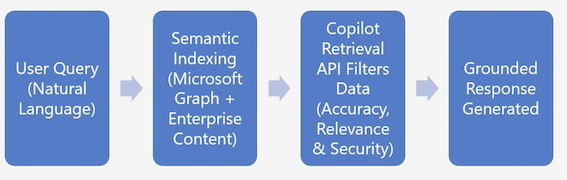
Best Practices for Reviewing Grounding Data
- Evaluate content quality before upload; remove outdated or conflicting information
- Store authoritative content in SharePoint or OneDrive to include in semantic index
- Maintain consistent formatting to improve cleanliness and retrieval precision
- Regularly review permissions to ensure valid data sources for grounding
- Collaborate with domain SMEs to validate accuracy and contextual fit
Organize Business Solution Data to Be Available for Other AI Systems
Overview
Introduction to organizing business solution data for AI systems
Retrieval-Augmented Generation (RAG) is an architecture that separates prototypes from trustworthy systems
A RAG pipeline is the system that performs all the steps required to make RAG work in a production environment including:
- Handling the data ingestion
- Streaming, cleaning, chunking, embedding, and indexing
- Retrieval, prompt assembly, orchestration, and monitoring
There are several advantages of leveraging RAG pipelines:
- Empowering LLM solutions with real-time data access
- Preserving data privacy
- Mitigating LLM hallucinations
Key concepts for organizing AI ready data
Drive transformation with Azure Data & AI platforms
Azure provides the foundational components necessary to centralize, transform, and govern data before AI systems consume it. Key concepts include:
- Unified data estate consolidates data from apps, logs, CRM, ERP, operations, and documents
- Modern data services include Azure Cosmos DB, Azure SQL, Azure PostgreSQL, and Fabric Lakehouse
- Intelligence layers provide Azure AI Search, semantic ranking, embeddings, and vector search
- Interoperability via APIs, event hubs, and data streaming supports multiple AI systems using the same data
Key concepts for organizing AI ready data
| Layer | Purpose |
|---|---|
| Operational Databases | Store app + business data with structure |
| Analytical Stores (Lakehouse / Warehouse) | Prepare curated data for AI/ML |
| Intelligence Layer (Search + Vector Index) | Enable grounding, retrieval, semantic search |
| AI Apps + Agents | Copilot, custom RAG apps, autonomous agents |
Data architecture for AI agents across the organization
Designing AI-optimized data architecture per Microsoft Cloud Adoption Framework
- Centralized knowledge sources include SharePoint, OneDrive, Dataverse, and Azure Storage
- Semantic indexing converts enterprise content into semantic representations for grounding
- Data governance layer enforces role-based access, sensitivity labels, and Microsoft Purview policies
- APIs and connectors ensure AI agents access structured and unstructured data
- RAG ready architecture includes vector stores, embedding models, and retrieval pipelines
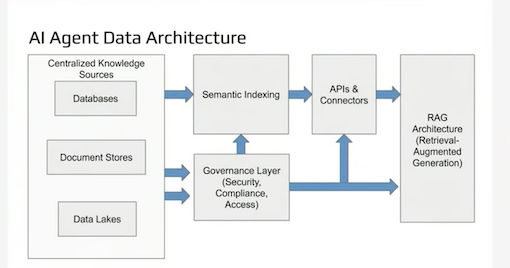
Key concepts for organizing AI ready data
Chart: Azure Data Estate for AI
| Layer | Purpose |
|---|---|
| Operational Databases | Store app + business data with structure |
| Analytical Stores (Lakehouse / Warehouse) | Prepare curated data for AI/ML |
| Intelligence Layer (Search + Vector Index) | Enable grounding, retrieval, semantic search |
| AI Apps + Agents | Copilot, custom RAG apps, autonomous agents |
Make databases AI ready
Capabilities of Microsoft database technologies for AI applications
- Azure SQL supports vector data, semantic search, and JSON storage
- Cosmos DB offers low latency and native vector search for AI-driven apps
- PostgreSQL on Azure supports ML extensions and embeddings
- Fabric provides a unified analytics platform for AI workloads
Use cases:
- Storing embeddings for RAG apps
- Managing structured and unstructured content
- Supporting real-time AI agent decisions
- Performing high-volume transactions required by autonomous agents
Best practices for organizing business data for AI systems
Key recommendations to optimize data for AI consumption
Centralize your data
Use Azure, Dataverse, or Fabric to avoid scattered data silos.
Normalize & structure data
Standardize schema, naming, metadata, and taxonomy.
Use semantic indexing
Microsoft 365 Copilot requires semantic indexing.
Provide multiple access paths
- APIs
- Search Indexes
- RAG Pipelines
- Graph Connectors
- SQL Endpoints
Implement governance early
Use Purview for:
- Access Policies
- Sensitivity Labels
- Lineage
- Data Quality Rules
Keep data authoritative & updated
Timeliness is essential—AI systems must reference the latest information.
Summary Analyze requirements for AI-powered business solutions
4 Design overall AI strategy for business solutions Part 1
4-1 Implement the AI Adoption Process from the Cloud Adoption Framework for Azure
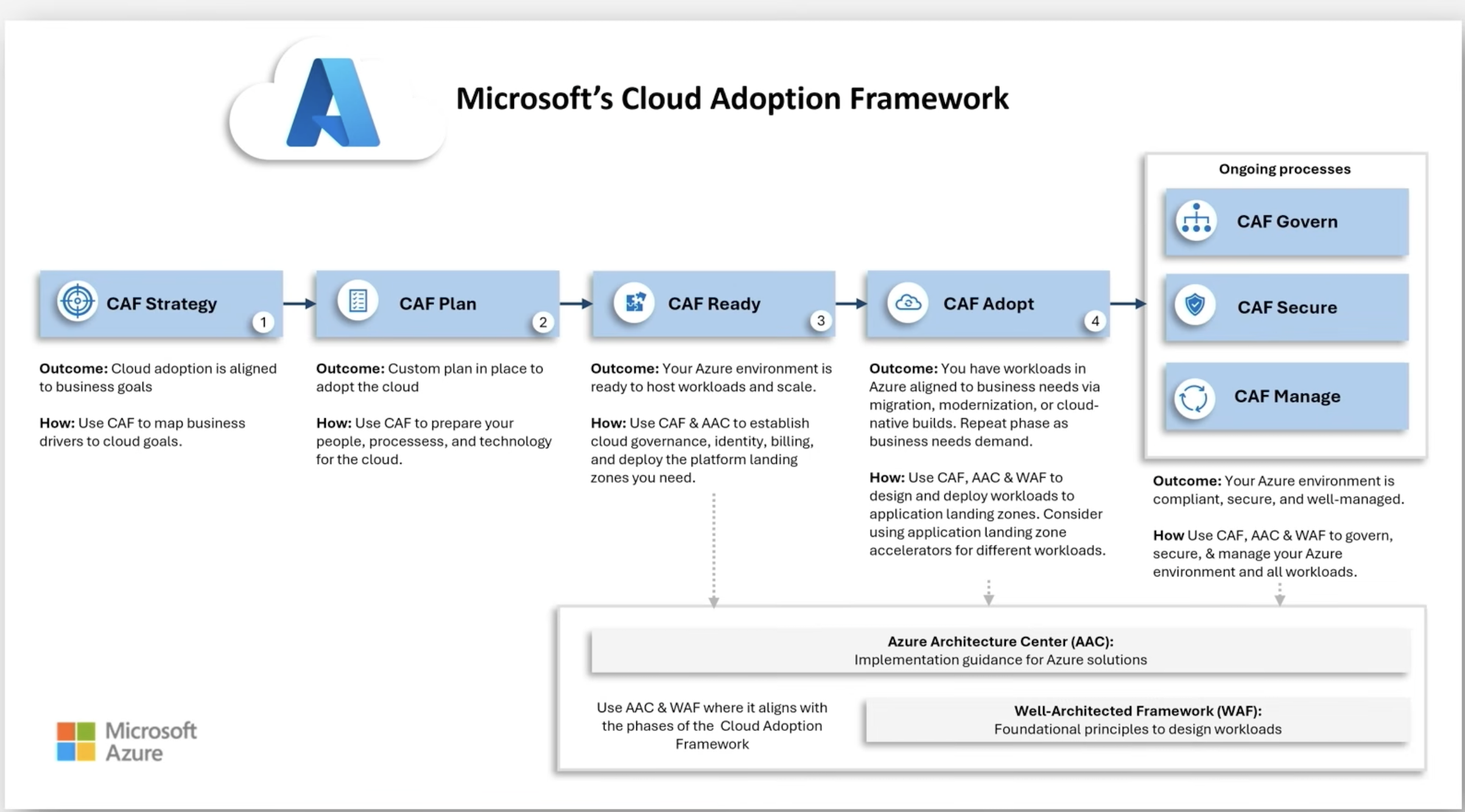
Unified Model Overview
Why Unify?
CAF provides an end-to-end adoption backbone for AI solutions on Azure.
Agent Adoption guidance layers in the operating model for planning, governing, building, and operating AI agents.
Aligning CAF and Agent lifecycle frameworks reduces risk, prevents agent sprawl, and accelerates value realization.
- CAF AI adoption defines foundations and operational guardrails.
- Agent lifecycle defines how teams plan, govern, build, and operate agents.
Phase by Phase Guidance and Deliverables
AI Strategy = Plan Agents
Goals: Document business outcomes, prioritize use cases, select Microsoft AI technologies, decide platform (SaaS vs. custom).
Key activities: Identify high impact AI use cases; define success metrics and ROl hypotheses; create technology plan; draft data and Responsible AI strategies.
Outputs: AI Strategy brief and Agent Technology Plan (decision tree, platform choice, guardrails).
Checklist excerpt: Define AI tech, data, and Responsible AI strategies; build business plan and rank use cases by impact/feasibility.
AI Ready 2 Govern & Secure Agents (foundation)
Goals:
- Establish landing zones, resource organization, connectivity, and AI governance boundaries.
- Put agent governance in place: roles, standards, and development process.
Key activities:
- Build AI environment;
- choose reference architectures;
- use Azure landing zones for scale.
- Define agent governance policies for capability access, data boundaries, approvals, and monitoring.
- Prepare data architecture for agents to operate on authoritative, governed sources.
AI Ready = Govern & Secure Agents (foundation continued)
Outputs:
- AI landing zones
- Policy assignments
- Network segmentation
- Governance charter
- Data access model.
Checklist excerpt: Establish governance, networking, reliability, foundation; choose architectures and desion areas
Build Agents = AI Ready-Adopt (execution on Azure)
Goals:
- Standardize agent building process;
- prevent architecture drift and security gaps.
Key activities:
- Provide development process guidelines for Copilot Studio and Foundry
- Select platform services for AI (PaaS) and follow reference architectures.
Outputs:
Standard agent templates, evaluation gates, environment strategy, and CI/CD with policy guardrails.
Manage AI 2 Operate Agents (run, monitor, improve)
Goals:
Operationalize AI workloads and agent fleets with monitoring, cost controls, release practices, and business continuity.
Key activities:
- Define deployment authority;
- implement monitoring/telemetry and SLOs.
- Establish agent operations: rollout patterns, behavior monitoring, performance tuning, lifecycle management.
Outputs:
AI operations baseline (observability, incident response, cost/usage reports) and Agent Ops playbook (SLOs, retraining rules, deprecation).
RACI Snapshot Example
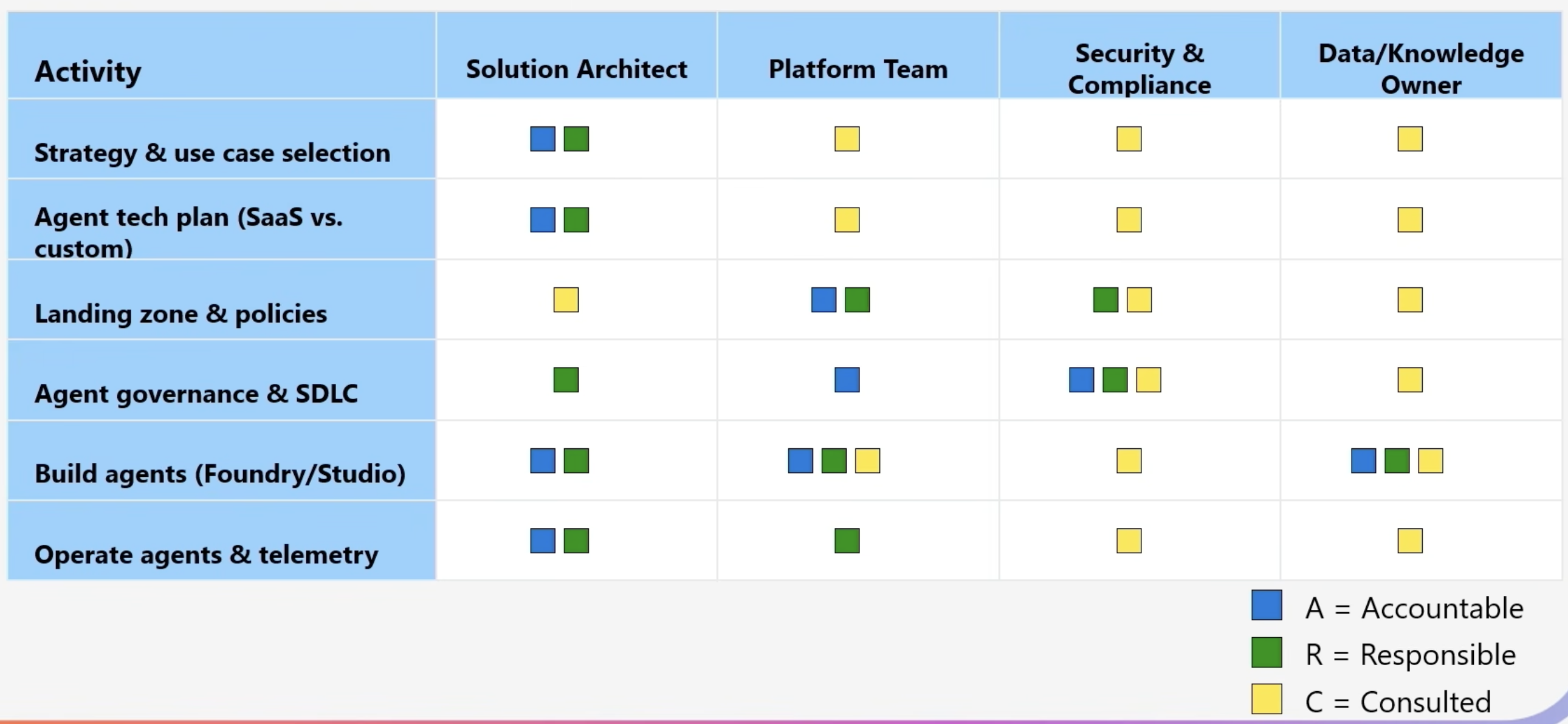
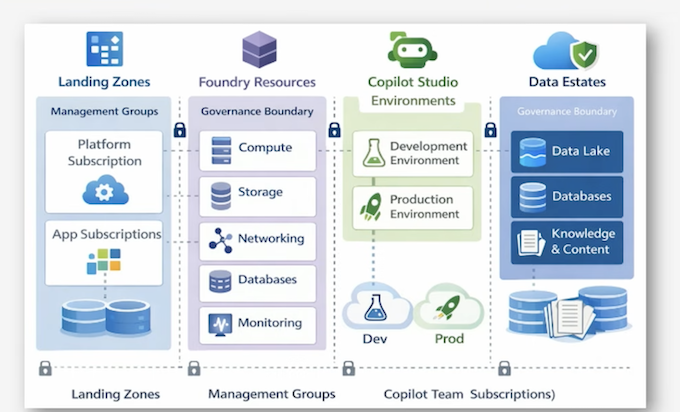
Agent Governance
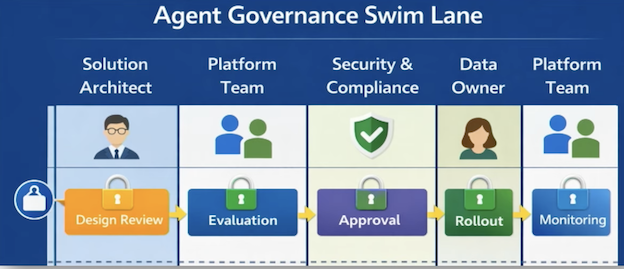
Actionable Checklists: Strategy & Planning
- Use case inventory with quantified outcomes and success metrics.
- Agent platform decision (SaaS vs. custom) with cost/effort fit.
- Skills assessment and upskilling plan (architects, data, security).
Actionable Checklists: Ready & Foundations
Landing zone(s) with management groups for external vs. internal workloads; baseline policies applied.
Data foundation for agents (authoritative sources, access model, lineage).
Actionable Checklists: Govern & Secure
-
Document AI and agent policies; define approvals, change control, and evaluation criteria.
-
Implement platform security for models, data, keys, and endpoints; maintain a complete AI asset inventory.
Actionable Checklists: Build & Operate
-
Standardized agent build process, templates, and CI/CD; adopt reference architectures for PaaS AI.
-
Operational telemetry and SLOs for workloads and agents; cost and incident runbooks.
4-2 Design the Strategy for Building AI Agents in Business Solutions
Understanding the Role of AI Agents in Business Solutions
AI agents: automate tasks, synthesize information, trigger worktlows, and execute complex multi-step logic.
Microsoft's Cloud Adoption Framework: guides architects on adopting ready-to-use SaaS agents or building custom agents using Foundry, Copilot Studio, or containerized models.
Dynamics 365 copilots: provide guided actions, summarization, automated updates, and customer service support as benchmarks.
More information:
https://learn.microsoft.com/en-us/azure/cloud-adoption-framework/ai-agents/
Technology Decision Framework for Agent Design
SaaS agent first principle
Begin with: Does a SaaS agent meet the functional requirements?
If yes, use it.
If no, determine whether low-code or pro code custom agents are needed.
Microsoft's technology plan emphasizes this decision tree approach.
Custom agent platform choices: Copilot Studio (Low-code / SaaS)
Best for:
- Fast deployment
- Direct integration with Dynamics 365 apps
- Business analyst-driven customization
- Retrieval and task agents
Provides:
- Prebuilt connectors
- Azure AI Search integration
- Built-in responsible AI features
4-3 Technology Decision Framework for Agent Design
Custom agent platform choices: Microsoft Foundry (Pro-code / PaaS)
Best for:
- Complex orchestrations and multi agent workflows
- Custom logic, advanced generative behavior
- Integration with enterprise systems at scale
Foundry provides:
- Declarative or code-first agent models
- Hosted execution environment
- Model catalog with multiple options
- Support for Activity Protocol and agent-to-agent interactions
Technology Decision Framework for Agent Design
Custom agent platform choices: GPUs & Containers (Pro code / laaS)
Use When:
- You need full control of model execution
- Agents must run on private, isolated compute
- Strict compliance environments require BYO model hosting
Architectural Design Considerations
Plan for single-agent vs multi-agent systems
Start with a single agent. Unless the use case:
- Crosses security or compliance boundaries
- Requires orchestration across multiple teams
- Demands modular specialization
Only scale to multi-agent systems after validating complexity drivers.
Architectural Design Considerations
Integrate agents with enterprise data
Data quality, relevance, and accessibility determines agent reliability.
Architects must define:
- Grounding data sources
- Data quality and freshness expectations
- Indices and schemas for retrieval
- Least privilege access models
Dynamics 365 copilots illustrate how deep domain data integration improves task success rates.
Architectural Design Considerations
Align deployment with operational realities
Choosing the right hosting and security model depends on:
- Required network isolation
- Expected latency and availability
- Integration with Azure management and monitoring
- Operational continuity and change management processes
Foundry's standard setup supports private networking for sensitive workloads.
Agent Architecture Comparison Chart
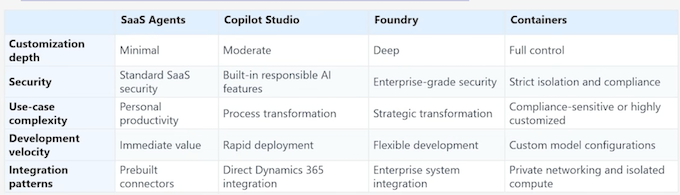
4-4 Design a Multi-Agent Solution
When to Use Multi-Agent-and When Not To
Start simple, scale when evidence requires it.
Single agent design consolidates logic, reduces coordination overhead, and simplifies governance.
Multi-agent systems decompose responsibilities across specialized agents to enforce separation of concerns and scale across domains.
Choose multi-agent first if:
- Crossing security/compliance boundaries
- Multiple teams own distinct data
- Roadmap demands expansion
- Multiple dependencies exist
• Otherwise, validate with a single agent before adding orchestration.
Platform Roles in a Multi-Agent Solution
Design multi-agent systems by assigning the right platform to each role
- Microsoft 365 Copilot (SaaS): Domain agents embedded in Microsoft 365 experiences for immediate value with limited customization.
- Copilot Studio (low code SaaS): Rapidly build task and retrieval agents with prebuilt connectors and guardrails; ideal for business-led processes and quick iteration.
- Microsoft Foundry (pro code): Build connected agents and sophisticated workflows with deeper control; best for strategic, high integration scenarios.
Design guidance:
Start with SaaS agents, introduce Copilot Studio for tailored workflows, escalate to Foundry for complex orchestration and custom tools.
Orchestration Patterns with the Microsoft Agent Framework
Sequential orchestration: Deterministic pipeline for staged tasks (plan → enrich → verify → act)
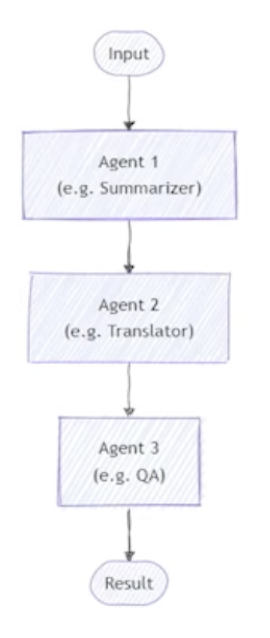
Concurrent orchestration: Parallel agents tackle independent subtasks; aggregate and reconcile
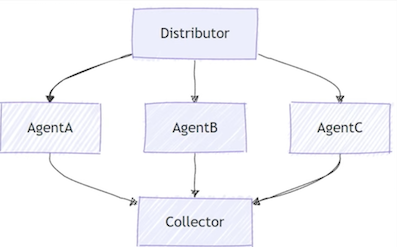
Group chat orchestration: Mediated conversation where agents contribute proposals and a moderator agent arbitrates.
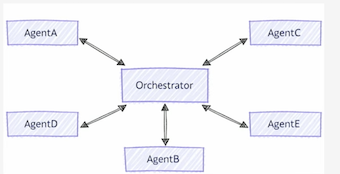
Handoff orchestration: Transfer context and control to a specialist agent or human when escalation triggers.
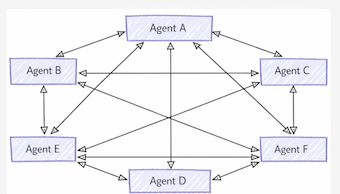
Orchestration Patterns with the Microsoft Agent Framework
Magnetic orchestration: Dynamic specialization where a "magnet" pulls in the right expert agents at runtime.
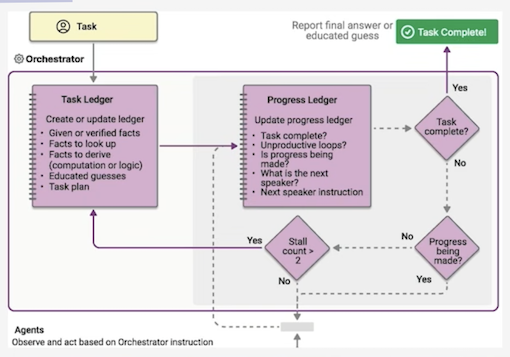
Reliability tip: Treat orchestration as workflow with state, branching, and error handling. Avoid "prompt-to-prompt" daisy chains that are brittle and unobservable.
Platform Role Mapping
| Role | Best fit platform | Why | Typical orchestration |
|---|---|---|---|
| Domain assistant (productivity) | Microsoft 365 Copilot | Immediate value in flow of work | Handoff / group chat |
| Business workflow agent | Copilot Studio | Rapid iteration, connectors, guardrails | Sequential / handoff |
| Integration/orchestration agent | Foundry | Pro code tools, complex flows, custom evals | Concurrent / sequential / Magnetic |
4-5 Develop the Use Cases for Prebuilt Agents in the Solution
Understanding Prebuilt Agents
Prebuilt Microsoft 365 Copilot agents are ready to use intelligent assistants that help employees complete tasks, retrieve information, and accelerate workflows across Microsoft 365 applications.
Prebuilt agents are especially effective when:
- Business processes depend on frequently accessed information
- Tasks are repetitive and high frequency
- Manual search or drafting consumes time
- Standardization of responses improves quality
- Employees work across Microsott 365 (Teams, Outlook, Word, etc.)
AI agents deliver value by reducing effort, improving decision accuracy, and accelerating knowledge driven tasks.
Mapping Business Processes to Prebuilt Agent Capabilities
- Process Identification
Architects evaluate:
- Where employees lose time searching for information
- Steps filled with manual review or drafting
- Frequent questions routed to support teams
-
Tasks that follow a predictable workflow pattern
-
Task-to-Agent Capability Matching
-
Feasibility Evaluation
Architects confirm:
- Required data exists in Microsoft 365
- Interaction model fits conversational patterns
- No advanced multi agent orchestration is required
- Output accuracy expectations align with retrieval first responses
This mirrors guidance for quickly deploying prebuilt agents with minimal confiauration while still enablina tailoring
Example Use Case Blueprints
HR Policy Assistant:
- Employees frequently ask HR policy questions;
- agent retrieves relevant policy information, summarizes answers, and provides clear responses;
- expected outcome is lower HR workload, fast self-service answers, and consistent guidance.
Operations Daily Summary Assistant:
- Managers consolidate updates across dashboards, chats, and email;
- agent summarizes daily updates and produces consolidated insights for planning;
- expected outcome is improved operational alignment and decision speed.
Travel Guidance Assistant:
- Employees need consistent guidance for corporate travel;
- agent provides travel rules, health/safety guidelines, and documentation requirements;
- expected outcome is reduced confusion, faster planning, and fewer support inquiries.
4-6 Define the solution rules and constraints when building AI components (with Copilot Studio, Microsoft Foundry, and Foundry Tools)
Solution Constraint Pyramid
Behavioral Rules -> Data & Tool Constraints -> Env, Gov, Ops Guardrails
Behavioral Rules and Responsible AI Constraints
Behavior Envelopes
Define what an agent is allowed and not allowed to do.
Required Constraints
- Define explicit boundaries: "Agent may summarize," "Agent may not decide," "Agent may not
- execute financial transactions."Include disallowed behaviors aligned to security, privacy, and safety policies
- Use structured instructions to prevent unsafe improvisation
Responsible AI (RAI) Controls
- Mandate use of bias and safety evaluation pipelines
- Apply strict instructions for citing sources, representing facts, and avoiding hallucination
- Require human in the loop checkpoints for high impact actions
Data Constraints and Governance Boundaries
Data Access Rules
Solution Architects must define explicit guardrails around data to avoid over exposure or unintended model hallucination
Rules
- Provide agents only the data they require
- Mask sensitive fields where retrieval is needed but full data is unnecessary
- Limit grounding sources to curated, authoritative datasets
- Enforce constraints on generative content
Data Movement and Storage Constraints
- Prevent persistent storage of messages unless compliance requires it
- Define memory policy (ephemeral vs. persistent)
- Restrict cross domain data access (HR, Finance, Legal)
Compliance and Regulatory Constraints
- Conform to organizational regulatory obligations
- Require human review for high risk tasks
- Enable mandatory auditing for tool invocation
Environment, Deployment, and Networking Constraints
Environment Rules
- Copilot Studio: Operates inside Microsoft 365 tenant boundary; isolated per environment
- Foundry: Requires architected deployment environment (VNet, private endpoints, region constraints)
- Microsoft 365 Copilot: Operates inside Microsoft 365 tenant boundary; operates within the company tenant.
- Ensure separation of development, testing, and production with dedicated configurations
Networking Constraints
- For Foundry: use private networking for confidential workloads
- Restrict external tool calls to whitelisted domains
- Require API isolation for sensitive system integrations
Operational Constraints
- Establish SLOs for reliability, latency, and throughput
- Require agent health monitoring and incident response plans
- Mandate rollback and fail safe procedures
Unified Rule Framework Across Platforms
| Rule Category | Copilot Studio Application | Foundry Application |
|---|---|---|
| Data Access | Strict connector scoping | Full control; must define explicit boundaries |
| Actions | Light task automation | Deep tool integration and orchestration |
| Governance | Platform enforced | Architect led, customizable |
| Risk Level | Low medium | Medium high |
| Evaluation | Built in safety | Requires evaluation pipelines |
4-7 Determine the use of generative AI and knowledge sources in agents built with Copilot Studio
Generative AI in Copilot Studio
- Generative AI power is activated primarily through generative answers enabling dynamic information surfacing without authored topics which reduces time enabling agents to: Interpret natural language queries
- Perform multi source retrieval
- Synthesize answers from enterprise data
- Provide coherent responses grounded in formal or informal knowledge assets
Generative AI in Copilot Studio Generative Orchestration Mode
Generative orchestration determines how broadly and deeply the agent can search across available knowledge. In this mode, Copilot Studio:
Automatically creates a "Conversational boosting" system topic containing a generative answers node
Can search up to 25 knowledge sources, filtered with GPT based relevance
May optionally include general knowledge, enabling the agent to answer out of domain queries when appropriate
This mode is ideal when users expect flexible, conversational, open-domain support rather than rigid topic-based interaction.
Comparison: Generative Orchestration vs Classic Orchestration
| Behavior | Generative orchestration | Classic orchestration |
|---|---|---|
| Topics | Selected based on the description of their purpose. | Selected based on matching a user query with trigger phrases. |
| Child and connected agents | Selected based on their description. | Not applicable. |
| Tools | Agent can choose to call tools based on their name and description. | Tools can only be called explicitly from within a topic. |
| Knowledge | Agent can proactively search knowledge to answer a user's query. | Knowledge used as fallback when no topics match or called explicitly. |
| Use of multiple topics, tools, knowledge sources | Agent can use a combination of topics, tools, and knowledge. | Agent tries to select a single topic, falling back to knowledge if configured. |
| Asking users for input | Agent automatically generates questions to prompt users for missing information. | Must use question nodes in topics to prompt users. |
| Responding to a user | Agent automatically generates a response using available information. | Must use message nodes in topics or call a tool. |
Knowledge Sources in Copilot Studio
Knowledge sources expand the breadth and depth of enterprise information an agent can reach.
They can be applied at:
- The agent level (global knowledge)
- The topic level (specific to a conversation flow)
- A generative answers node (primary or fallback retrieval)
- Authentication is enforced automatically: agents can only surface
content the current user is permitted to access.
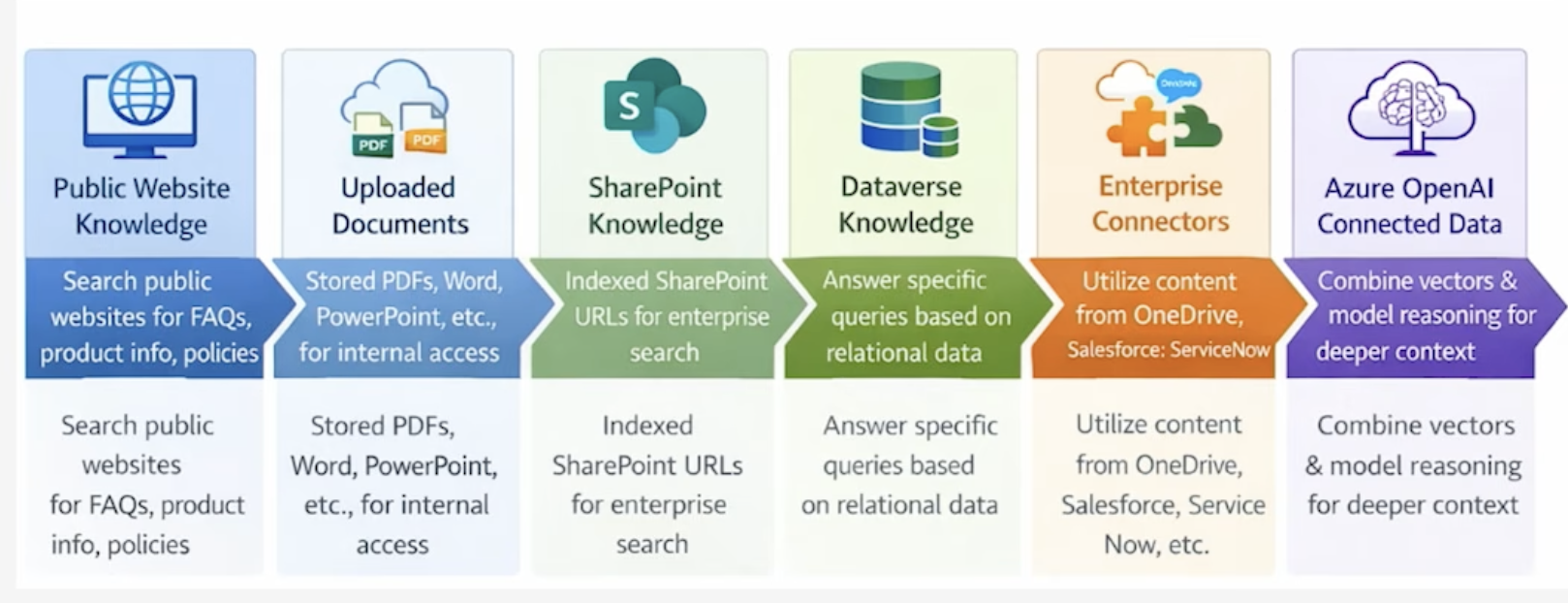
Using Unstructured Data as a Knowledge Source
Unstructured data from SharePoint, OneDrive, Salesforce, ServiceNow, Confluence, Zendesk ingested into Dataverse and converted into vector embeddings
This Provides:
- Provides high quality semantic search
- Rich grounding for generative answers
- Strong retrieval accuracy, and strict permission checks
Architectural Constraints:
- Maximum 500 knowledge objects per agent
- Maximum 5 unstructured sources per agent appearing simultaneously in retrieval
- Automatic background synchronization ensures content freshness
→ Unstructured knowledge sources are ideal for teams with large collections of PDFs, PPTX, DOCX, and knowledge base archives.
Using Azure OpenAl for Generative Answers
Azure OpenAl "on your data" enables generative reasoning over enterprise content through classic connections embedded inside generative answer nodes.
This Setup:
- Creates a direct connection to an Azure OpenAl resource
- Allows answers synthesized using enterprise embeddings and model reasoning
- Prioritizes node level knowledge sources over agent level sources
- Supports advanced configuration such as model selection and prompting parameters
Azure OpenAl is best for scenarios requiring:
- Complex reasoning
- Domain specific conversational understanding
- Long form answer generation leveraging enterprise indexed embeddings
Using Azure AI Search as a Knowledge Source
Azure AI Search integrates as a powerful index based information source when vector search or semantic ranking is required.
Capabilities Include:
- Retrieval of enterprise vector indexes
- Semantic ranking for high precision results
- Multiple authentication methods including key based, certificate based, or Entra ID-based
- Metadata based citation mapping through index fields
This is the preferred solution when content volume is large and requires:
- Scalable indexing
- Enterprise grade search relevance
- Vector search for embedding aligned retrieval
Selecting the Right Generative Knowledge Architecture
Data Complexity
- Structured → Dataverse
- Semi structured → Azure AI Search
- Unstructured → SharePoint/OneDrive/Salesforce KB via Dataverse
Retrieval Precision Requirements
- High precision → Azure AI Search with semantic ranking
- Broad domain coverage → Generative orchestration with multiple sources
Governance & Security
- Sensitive documents → Unstructured data with strict permission inheritance
- Cross domain search → Generative orchestration with filtering
Performance & Latency Tolerance
- High throughput → Dataverse + Azure AI Search
- Low complexity Q&A → Public site or classic topic embedding
Knowledge Source Decision Matrix
| Knowledge Source | Precision | Governance | Data Size | Latency | Best Fit Scenarios |
|---|---|---|---|---|---|
| Public Website | Medium | Low | Large (External) | Medium | FAQs, product info, public policies |
| Uploaded Documents | High | Medium | Medium–Large | Medium | Internal docs, SOPs, reports |
| SharePoint Knowledge | High | High | Large | Medium | Enterprise content, role-based access |
| Dataverse Knowledge | Very High | Very High | Structured (Med) | Low | Transactional data, precise queries |
| Enterprise Connectors | Medium–High | High | Very Large | Medium–High | Cross-system search (Salesforce, ServiceNow, etc.) |
| Azure OpenAI Connected Data | Very High | High | Scalable (Large) | Medium | RAG scenarios, contextual AI, advanced insights |
4-8 Determine When to Build Custom Agents or Extend Microsoft 365 Copilot
Understanding the Decision Space
AI solutions within the Microsoft ecosystem span two primary approaches:
1. Extending Microsoft 365 Copilot
Extend Copilot when:
- Core Copilot capabilities already perform most of the required tasks.
- The business scenario aligns with productivity workflows inside Microsoft 365 apps.
- You primarily need Copilot to use organizational knowledge and automate small tasks.
- The solution benefits from Microsoft's built in Responsible AI guardrails.
- Custom logic, actions, and data integrations remain simple.
Extensions typically include:
- Creating connectors and plugins.
- Adding organization specific knowledge sources.
- Automating repetitive document and communication tasks.
- Enhancing Copilot behavior in existing applications.
2. Building Custom Agents
- Build custom agents when:
- You need specialized workflows that Copilot cannot handle.
- Your scenario requires custom reasoning patterns, multi step logic, or orchestration.
- Integration requires direct system APls, external applications, or operational autonomy.
- You need multi-agent collaboration or complex, domain-specific behavior.
- You require execution outside Microsoft 365 environments.
Custom agents provide greater control over:
- Prompt engineering and orchestration.
- Data routing and grounding.
- Tooling integration and model selection.
- Multi-agent collaboration.
- Operational behavior and lifecycle management.
Custom Model Lifecycle

Key Architectural Evaluation Criteria
Below are critical criteria solution architects should consider when selecting an approach:
Scope and Complexity
| Criteria | Recommended Approach |
|---|---|
| Simple retrieval or summarization | Extend Copilot |
| Complex multi-step workflow | Build custom agent |
| High-volume automation | Build custom agent |
| Productivity-only context | Extend Copilot |
Governance, Compliance, and Skill Maturity
| Aspect | Custom Agents | Extend Copilot |
|---|---|---|
| Governance and Compliance | Custom governance and operational policy definitions; monitoring and model behavior controls | Enterprise-grade safety and Responsible AI guardrails; built-in compliance and security |
| Skill and Operational Maturity | Strong expertise in Azure AI, agent orchestration, and system architecture required | Low-code approach; rapid enablement preferred |
4-9 Determine When Custom AI Models Should Be Created
When Prebuilt or Catalog Models Are Sufficient
Before considering custom models, confirm whether existing models from Microsoft Foundry's model catalog or Azure OpenAl already meet requirements.
Prebuilt or catalog models fit well when:
- The use case is general-purpose
- Moderate accuracy is acceptable.
- The agent interacts primarily with enterprise knowledge sources
- The domain data is not complex or does not require deep contextual understanding.
- Time-to-value is a priority.
- Teams want low-cost, low-risk deployment.
Examples:
- Drafting customer emails
- Policy Q&A
- Document summarization
- Meeting recap
- Basic conversation automation
- Knowledge retrieval agents
When Custom Al Models Should Be Created
A custom model is recommended in the following situations.
A. Domain-Specific Intelligence Required: Highly specialized workflows, industry compliance, proprietary knowledge, unique terminology/business rules
B. Off-the-Shelf Accuracy Insufficient: Persistent low precision/recall, high hallucination risk, costly errors, need for deterministic outputs — even after advanced tuning
C. Governance & Compliance Demand Full Control: Strict explainability, custom guardrails, predictable reasoning, full data residency/sovereignty, transparent lifecycle
D. High-Scale or High-ROl Scenarios: Extremely high usage volume, small per-query savings multiply significantly, major revenue/efficiency lift from optimizations
E. Multi-Agent Systems Needing Custom Reasoning: Specialized agent roles, multi-step planning, long-horizon tasks, workflow orchestration, explicit memory/collaboration
Data Requirements for Custom Models
Custom model development requires:
- Large volumes of high-quality labeled domain data
- Strong data governance and cleaning processes
- A repeatable pipeline for training, evaluation, and deployment
- Defined taxonomy and annotation guidelines
- Continuous retraining and monitoring strategy
- Access to skilled data scientists and MLOps engineers
If these requirements are not yet met, extending Microsoft 365 Copilot is often the better starting point.
4-10 Develop the Use Cases for Customized Small Language Models
Understanding Customized Small Language Models
Customized SLMs can be built by:
- Domain tuning: Adding domain knowledge through structured corpora or curated enterprise documents
- Behavior tuning: Controlling style, reasoning depth, safety behavior, or operational constraints
- Task optimization: Specializing the model for retrieval, classification, summarization, planning, or tool use patterns
SLMs deliver high performance with small memory footprints and low latency. They excel where large models are too costly or unnecessary
Use Cases for Customized Small Language Models
Domain-Specific Knowledge Workflows
Precise, context-specific outputs from proprietary data — compliance analysis, contract risk, medical/legal/financial reasoning. Minimizes hallucinations by constraining behavior around enterprise-validated data.
Operationally Constrained Environments
Edge/loT devices, high-volume inference, real-time analytics, and offline scenarios. Reduced memory footprint with cost-predictable inference.
Enterprise Security & Safety
Full control over training data, transparent evaluation pipelines, and elimination of external dependencies. Safety guardrails embedded directly into the model.
Enhanced Productivity
- Tuned to internal writing styles for operational reports, knowledge base articles, and enterprise-aligned summaries.
- Outputs feel native to the organization.
Reasoning-Heavy & Multi-Step Workflows
- Low-cost chain-of-thought reasoning, multi-agent orchestration, and domain-specific workflow routing. Tuned SLMs
- can outperform larger models in specialized environments.
Use Cases against Customized Small Language Models
It is important to keep common pitfalls and risks in mind when identifying whether to use an SLM.
Anti-patterns:
- Building a custom SLM when RAG over a general model would suffice
- Underestimating data curation and evaluation effort
- Treating SLMs as a silver bullet for hallucinations
- Using SLMs for broad, creative reasoning tasks better suited to LLMs
Risks:
- Overfitting to narrow data
- Poor generalization to edge cases
- Governance gaps if safety tuning is rushed
Architecture Considerations for Customized SLM Use Cases
Data, Safety, and Deployment
Data Requirements
- High quality curated datasets
- Domain specific terminology and structured examples
- Clean and labeled text
Safety & Governance Requirements
- Define safety boundaries and
- moderation requirements
- Evaluate model against harmful or noncompliant outputs
Deployment & Integration
- Integration with Copilot based orchestration
- Compatibility with agent tools and enterprise connectors
- Performance testing under real world user loads
Evaluation and Success Metrics for SLMs
When evaluating an SLM, architects can measure its success through specific metrics such as the below that can be included in an SLM Success Scorecard:
- Task accuracy/success rate
- Latency targets
- Cost per 1,000 requests
- Safety incident rates
- Drift or degradation over time.